Accessibility That Ships: A Senior Front-End Checklist
Accessibility isn’t a final audit. It’s a set of habits in every component you merge. This is the checklist I use on government, fintech and enterprise products, in English and Arabic.
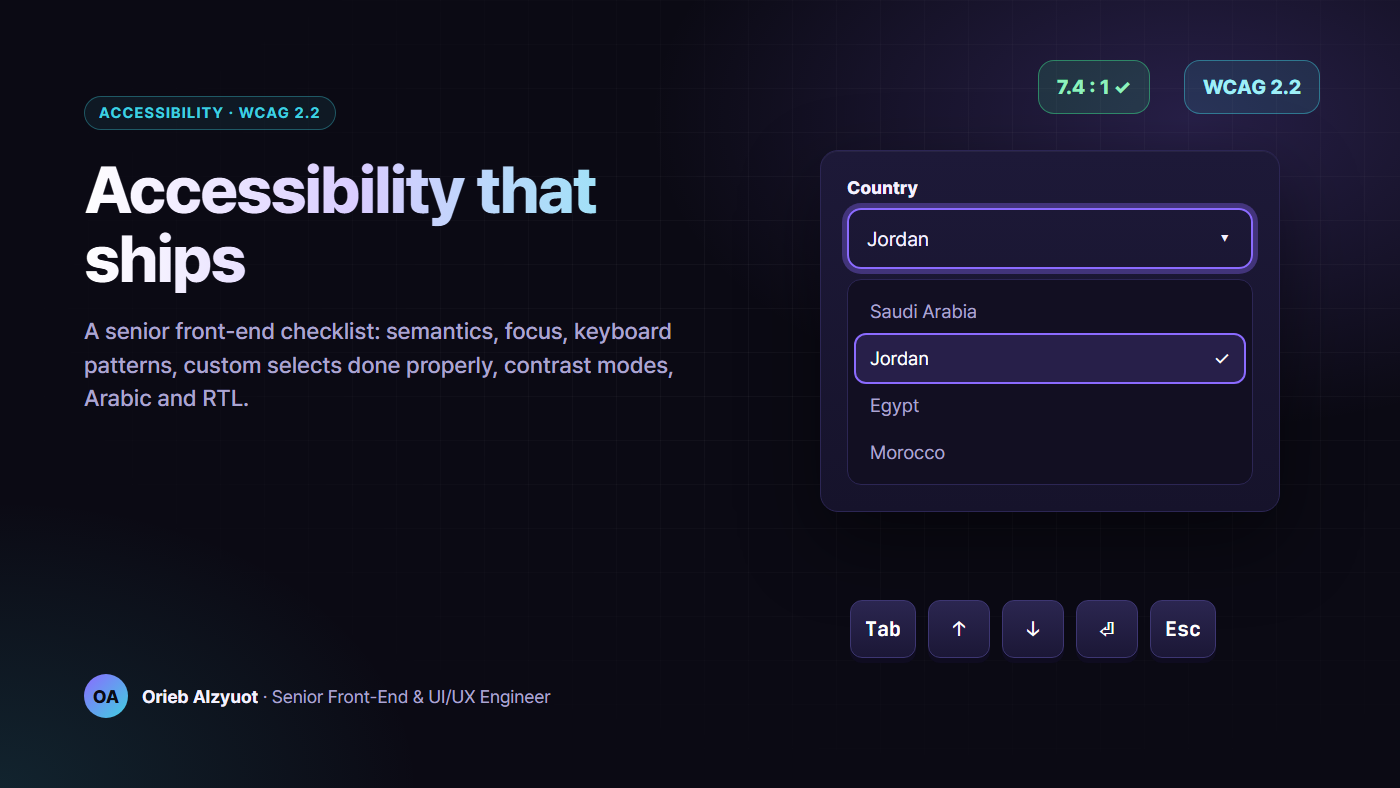
Most accessibility bugs I fix aren’t exotic. They’re the same dozen mistakes: a div with a click handler, a focus ring someone removed, a custom dropdown that traps the keyboard, a toast nobody hears, an Arabic page whose screen reader speaks English. Each one is cheap to prevent and expensive to find later.
The target in this article is WCAG 2.2 Level AA. It’s the current W3C recommendation, and it’s what most procurement rules and accessibility laws point to, including the European Accessibility Act, which has applied since June 2025. Check your own legal obligations with your legal team. The engineering work is the same either way.
TL;DR
- Native HTML first.
<button>,<a href>,<label>,<dialog>and<select>give you keyboard support, roles and states for free. - Focus is a feature. Keep it visible and never hidden behind sticky headers, move it on route changes, and return it when dialogs close.
- Follow the ARIA Authoring Practices Guide (APG) for custom widgets. Users already know the keys.
- Don’t fight the native
<select>. Style what’s styleable. If you need more, build an APG combobox properly. - Announce changes with live regions that exist before you update them.
- Respect user settings: reduced motion, 200% text, forced colours, and your own in-app contrast modes.
- Arabic is not English mirrored. It needs
lang,dir, isolated numbers and mirrored keyboard behaviour. - Test three ways: axe in CI, a keyboard-only pass, and a real screen reader.
1. Semantic structure: the free 60%
Before any ARIA, get the HTML right. Screen reader users navigate by landmarks and headings, so give them a page that has both.
<body>
  <a class="skip-link" href="#main">Skip to content</a>
  <header>…<nav aria-label="Main">…</nav></header>
  <main id="main" tabindex="-1">
    <h1>Applications</h1>
    <section aria-labelledby="pending-h">
      <h2 id="pending-h">Pending review</h2>
      <ul>…</ul>
    </section>
  </main>
  <footer>…</footer>
</body>
- One
h1per page, and headings that don’t skip levels for styling reasons. - Buttons do things, links go places. A “card” that navigates is an
<a>. A “row” that opens a panel contains a<button>. Never use<div (click)>. - Every input has a visible
<label>. Placeholder text isn’t a label. - Lists are lists. Screen readers announce “list, 12 items”, which is useful context.
- Set
langanddiron<html>, and update them when the user switches language. - Icon-only buttons need an accessible name, such as
aria-label="Close". Decorative icons getaria-hidden="true".
A framework-specific trap I see often: an icon-only button component receives aria-label on its host element, but the real <button> inside never gets it. Expose an ariaLabel input and bind it to the inner element.
2. Focus management
Keyboard and switch users can only act on what has focus, and they need to see it.
:focus-visible {
  outline: 3px solid var(--color-focus);
  outline-offset: 2px;
}

/* WCAG 2.2 · 2.4.11 Focus Not Obscured: keep focused elements clear of the sticky header */
html {
  scroll-padding-block-start: var(--header-height, 72px);
}
- Never
outline: nonewithout a replacement. Preferoutlineoverbox-shadow, because outlines survive Windows forced-colours mode. - Focus not obscured (SC 2.4.11, new in 2.2). Sticky headers, cookie bars and chat bubbles must not cover the focused element.
scroll-marginandscroll-paddingfix most cases. - Route changes in SPAs: move focus to the new page’s
h1(withtabindex="-1") or announce the new title. Otherwise screen reader users hear nothing after clicking a link. - Dialogs move focus inside on open and return it to the opener on close.
- Don’t steal focus with autofocus on page load, unless the page has one obvious job, such as a search page.
3. Keyboard patterns you will build
Don’t invent keyboard behaviour. The WAI-ARIA Authoring Practices Guide documents the patterns users already know: https://www.w3.org/WAI/ARIA/apg/
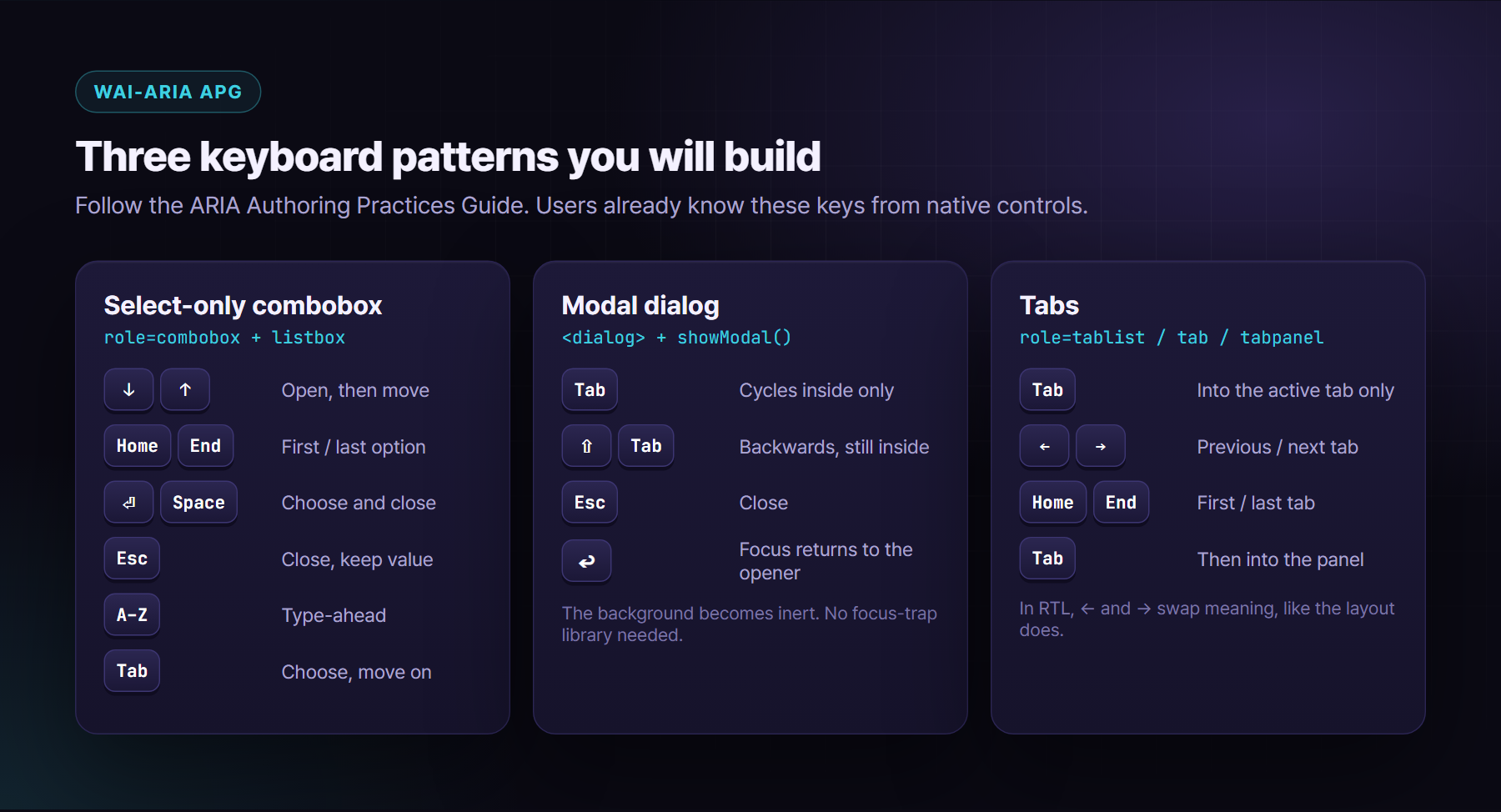
Dialogs: use the platform. The native <dialog> with showModal() gives you a top layer, a backdrop, Esc to close, and an inert background. You don’t need a focus-trap library:
const dialog = document.querySelector<HTMLDialogElement>('#confirm')!;
let opener: HTMLElement | null = null;

export function openConfirm(from: HTMLElement) {
  opener = from;
  dialog.showModal();                    // background becomes inert
  dialog.querySelector<HTMLElement>('[autofocus], button')?.focus();
}

dialog.addEventListener('close', () => opener?.focus()); // return focus
Tabs: roving tabindex. Only the active tab is in the Tab order (tabindex="0"). The others have tabindex="-1", and arrow keys move between them. In RTL, the left and right arrow keys swap meaning, just as the layout does.
4. Never style a native <select> beyond its limits
This is the one I argue about most. Designers want the dropdown list to match the brand. The native <select> popup is drawn by the browser and the OS, and it has historically been unstylable across browsers. Teams respond in one of two bad ways:
- They hide the
<select>and paint a fake one on top. Screen readers and the keyboard still talk to the hidden control, while sighted users see a different state. It breaks in every edge case. - They build a
divdropdown with mouse handlers only. There’s no keyboard support, no roles, and no announcement.
What you can style safely on a native select: font, colour, padding, border, radius, background, and the arrow, using appearance: none plus a background image. Leave the option list alone.
select {
  appearance: none;
  font: inherit;
  min-block-size: 44px;
  padding-block: 8px;
  padding-inline: 12px 36px;
  border: 2px solid var(--color-border);
  border-radius: 10px;
  background: var(--color-surface) url('data:image/svg+xml,…') no-repeat right 12px center / 12px;
}
select:dir(rtl) { background-position: left 12px center; padding-inline: 36px 12px; }
Customizable select is coming. Chromium now supports appearance: base-select, ::picker(select) and <selectedcontent>, which let you style the popup of a real <select>. Treat it as progressive enhancement: browsers that don’t support it show the normal select, which is fine.
@supports (appearance: base-select) {
  select, ::picker(select) { appearance: base-select; }
}
When to build a custom one: when you need options with avatars or descriptions, type-to-filter, or multi-select with chips. Then build the APG combobox pattern, or use a headless library that already has, such as Angular CDK’s listbox, React Aria or Radix. Here’s what “properly” means:
- ✅ Focus stays on the
role="combobox"element. The highlighted option is exposed witharia-activedescendant. - ✅
aria-expanded,aria-controlsandaria-haspopup="listbox"on the combobox.role="option"witharia-selectedon each option. - ✅ Keys: ↓/↑ open and move, Home/End, PageUp/PageDown, Enter or Space to choose, Esc closes without changing the value, Tab chooses and moves on, and type-ahead jumps to an option.
- ✅ Clicking an option doesn’t blur the combobox (
mousedown→preventDefault). - ✅ The active option scrolls into view, with a visible highlight that doesn’t rely on colour alone.
- ✅ A real form value (a hidden input or form-associated custom element), so forms and validation still work.
- ✅ RTL: the list aligns to
inline-start, the arrow mirrors, and Arabic type-ahead works. - ✅ Tested with NVDA and VoiceOver, not just axe.
The core of the keyboard handler:
combo.addEventListener('keydown', (e) => {
  if (!open) {
    if (['ArrowDown', 'ArrowUp', 'Enter', ' '].includes(e.key)) { setOpen(true); e.preventDefault(); }
    else if (e.key.length === 1) { setOpen(true); typeahead(e.key); }
    return;
  }
  switch (e.key) {
    case 'ArrowDown': move(active + 1); break;
    case 'ArrowUp':   e.altKey ? choose(active) : move(active - 1); break;
    case 'Home':      move(0); break;
    case 'End':       move(options.length - 1); break;
    case 'Enter':
    case ' ':         choose(active); break;
    case 'Escape':    setOpen(false); break;          // value unchanged
    case 'Tab':       choose(active); return;          // let focus move on
    default:          if (e.key.length === 1) typeahead(e.key); else return;
  }
  e.preventDefault();
});

function move(i: number) {
  active = Math.max(0, Math.min(options.length - 1, i));
  combo.setAttribute('aria-activedescendant', options[active].id);
  options[active].scrollIntoView({ block: 'nearest' });
}
Here it is in use, driven only by the keyboard:
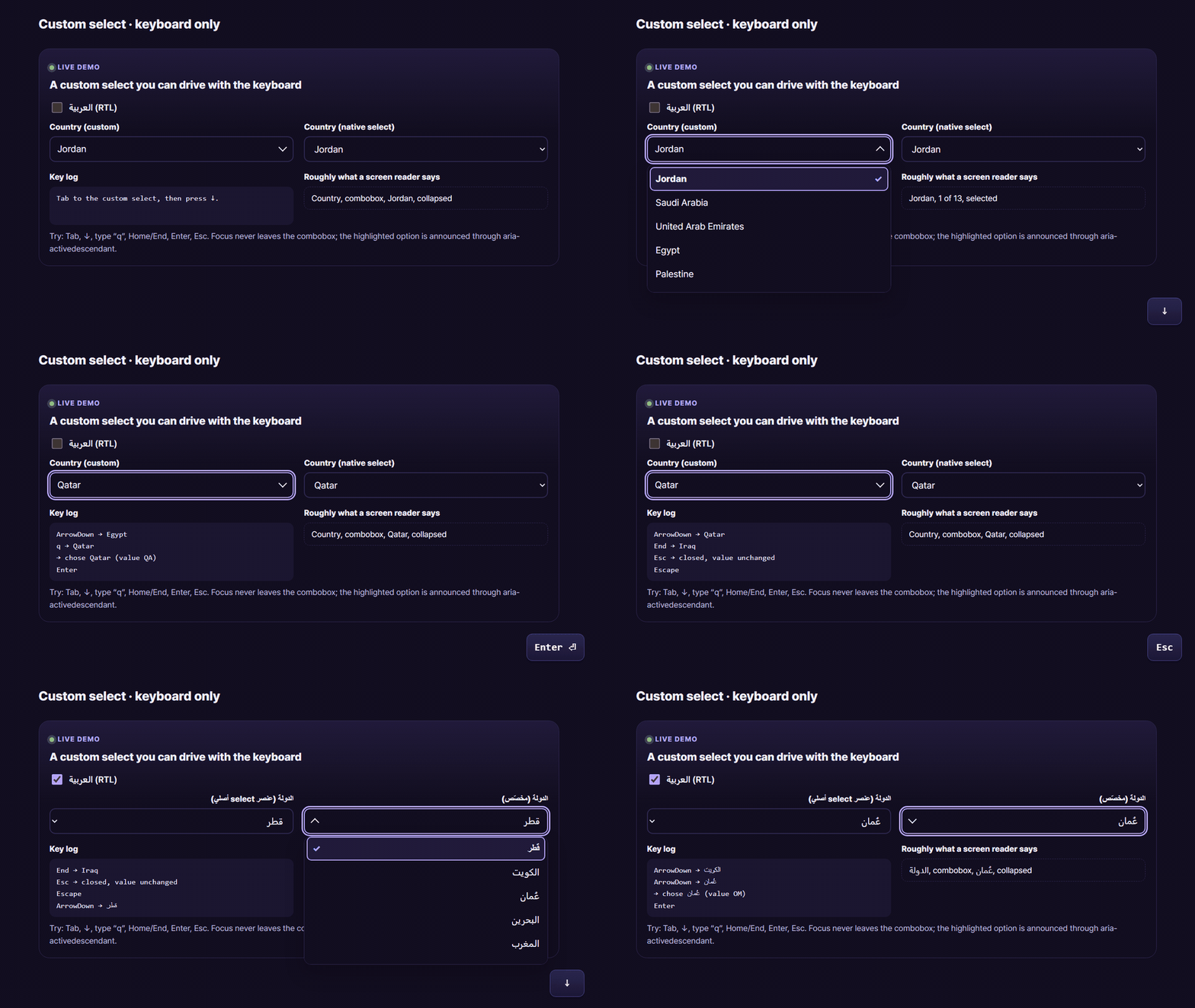
▶ Try it live: https://oriebalzyuot96.github.io/blog/accessibility-that-ships/#demo-select
5. Live regions: say what changed
When content changes without a page load, such as a saved toast, a validation summary, a “3 results” count or a chat message, screen reader users need to hear it. WCAG calls these status messages (SC 4.1.3).
<!-- Render once, empty, at app start. Updating a region that was just inserted often isn't announced. -->
<div id="sr-polite" class="visually-hidden" aria-live="polite"></div>
<div id="sr-assertive" class="visually-hidden" role="alert"></div>
export function announce(message: string, urgent = false) {
  const el = document.getElementById(urgent ? 'sr-assertive' : 'sr-polite')!;
  el.textContent = '';                        // clear so a repeated message is spoken again
  requestAnimationFrame(() => (el.textContent = message));
}

announce('Profile saved');                     // polite: waits for a pause
announce('Session expires in 1 minute', true); // assertive: interrupts. Use rarely.
- Polite by default. Use assertive only for things that need action right now.
- Don’t announce what has focus. If focus moved to an error message, it’s already being read.
- Toasts that vanish must stay long enough to read, and pause on hover or focus. Anything important also belongs somewhere permanent.
6. Motion
@media (prefers-reduced-motion: reduce) {
  *,
  *::before,
  *::after {
    animation-duration: 0.01ms !important;
    animation-iteration-count: 1 !important;
    transition-duration: 0.01ms !important;
    scroll-behavior: auto !important;
  }
}
That blanket rule is a safety net, not a design. Better:
- Design a reduced version of each meaningful animation: fade instead of slide, no parallax, no auto-playing video.
- Offer an in-app override (
data-motion="reduced|full"). Some users can’t change OS settings on a shared or managed machine. - Anything that moves for more than 5 seconds needs pause, stop or hide (SC 2.2.2, Level A). That includes carousels, tickers and animated backgrounds.
7. Text scaling, spacing and reflow
- Use
remfor type and spacing, so browser font settings work. Text must stay usable at 200% (SC 1.4.4). - Reflow at 320 CSS pixels (SC 1.4.10): no horizontal scrolling for normal content. That’s the same as 1280px at 400% zoom.
- Text spacing (SC 1.4.12): your layout must survive line-height 1.5, paragraph spacing 2×, letter spacing 0.12em and word spacing 0.16em. Don’t hard-code heights on text containers.
- A user font-scale setting is cheap:
html { font-size: calc(100% * var(--user-font-scale, 1)); }.
8. Contrast modes, readable fonts and link highlighting
Beyond meeting 4.5:1, many products I work on offer accessibility modes in a settings panel. Each one is a data attribute on <html>, read by CSS:
- High contrast: a palette with very high contrast and no decorative gradients, shadows or glass effects. Respect
@media (prefers-contrast: more)as the default. - Grayscale and invert: they help some users with colour-vision or light-sensitivity needs.
- Readable font: switches to a highly legible family. It must beat the Arabic font rule, too.
- Highlight links: adds underlines and a background, so links don’t rely on colour alone (SC 1.4.1).
- Text spacing and font size presets.
One engineering rule: never put filter on <html> or <body> for invert or grayscale. A filter creates a containing block for position: fixed descendants, so your sticky header, modals and toasts break. Apply it to a wrapper, and re-invert images and video inside it.
html[data-contrast="invert"] .app-root { filter: invert(1) hue-rotate(180deg); }
html[data-contrast="invert"] .app-root :is(img, video, picture) { filter: invert(1) hue-rotate(180deg); }
html[data-links="highlight"] a { text-decoration: underline 2px; text-underline-offset: 3px; }

@media (forced-colors: active) {
  .badge { border: 1px solid CanvasText; }        /* backgrounds disappear; keep shapes */
}
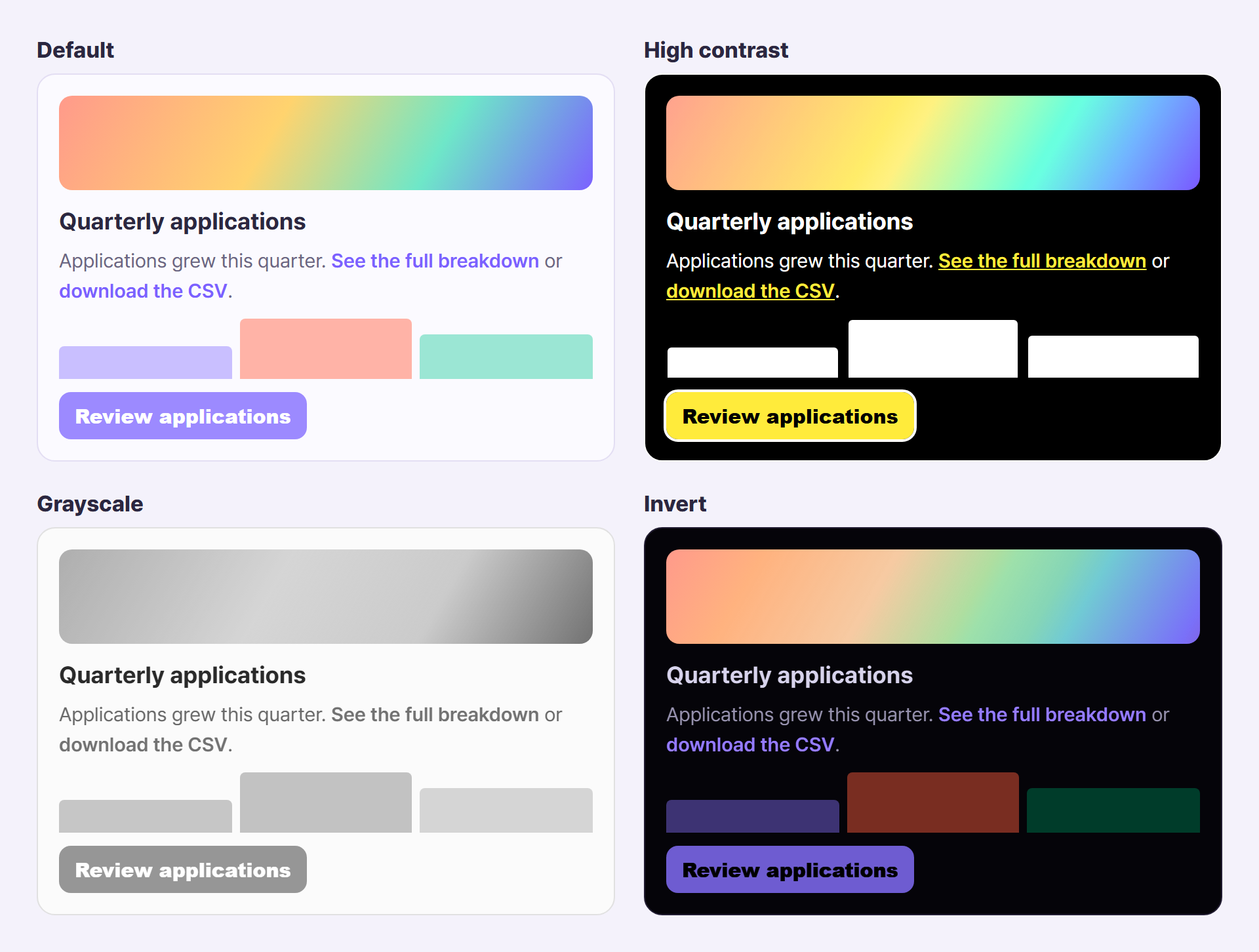
▶ Try it live: https://oriebalzyuot96.github.io/blog/accessibility-that-ships/#demo-modes
9. Accessibility in Arabic and RTL
Arabic accessibility is where “we support RTL” products quietly fail.
lang="ar"anddir="rtl"on<html>, updated at runtime. Screen readers choose the voice fromlang. Get it wrong and an English voice reads Arabic text, or reads nothing at all.- Mark inline language changes:
<span lang="en">Angular</span>inside Arabic text. - Isolate user content and numbers. A username or order number can flip the punctuation around it. Use
<bdi>ordir="auto"on user-generated text, and keep phone numbers, IBANs and code in LTR spans. - Mirror keyboard behaviour with the layout. In RTL tabs and sliders, the right arrow goes to the previous item.
- Translate accessible names. An
aria-label="Close"left in English is a bug on an Arabic page. Treat ARIA strings like any other copy. - Typography: Arabic often needs a slightly larger size and taller line-height to stay legible, and never letter-spacing, which breaks the joined letterforms. Avoid faux italics.
- Mirror what’s directional, not what’s real-world:
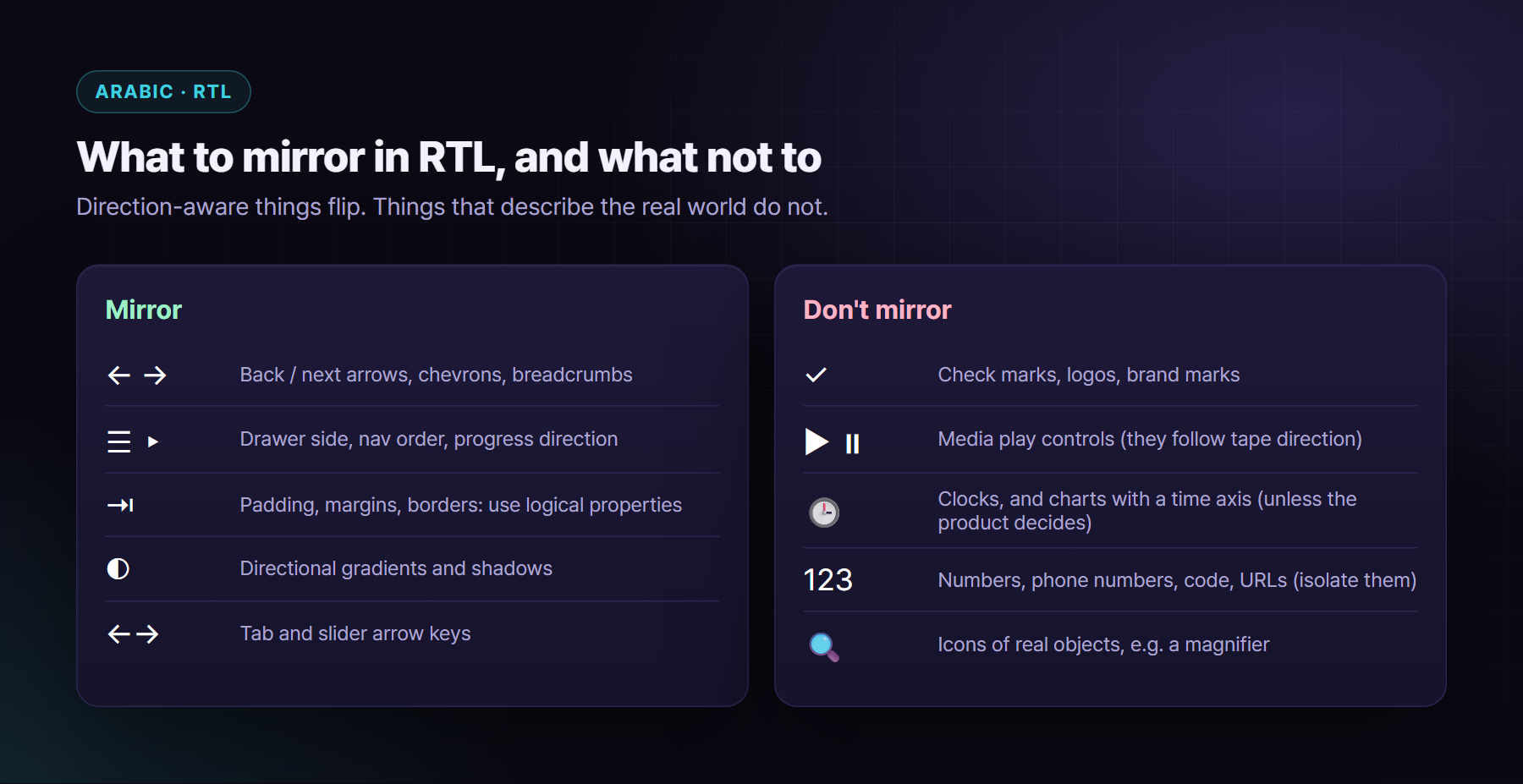
Test Arabic with a screen reader that has a good Arabic voice. NVDA, VoiceOver and TalkBack all support Arabic, but voices and settings vary. Listen to a full form at least once.
10. Forms and authentication (the WCAG 2.2 additions)
- Errors are text, linked to the field:
aria-invalid="true"plusaria-describedbypointing at the error message. Don’t overwrite an existingaria-describedby; append to it. autocompleteattributes (email,given-name,one-time-code) help everyone, and they’re required for user data fields (SC 1.3.5).- Redundant entry (SC 3.3.7): don’t make people type the same thing twice in one process. Pre-fill it or let them choose it.
- Accessible authentication (SC 3.3.8): no memory or puzzle test unless there’s an alternative. Allow paste and password managers, and support passkeys, magic links or OTP codes with
autocomplete="one-time-code". CAPTCHAs are covered in the security article in this series. - Target size (SC 2.5.8): interactive targets at least 24×24 CSS pixels, or enough spacing around them. I use 44px for primary touch targets anyway.
- Dragging movements (SC 2.5.7): every drag-and-drop needs a single-pointer alternative, such as “Move up” and “Move down” buttons.
11. Testing: axe, keyboard and screen readers
Automated tools find only part of the problems. They’re great at missing names, contrast and invalid ARIA, and blind to “this flow makes no sense”. Use all three layers.
1. axe in CI with Playwright, on every key page, in each theme and direction:
import { test, expect } from '@playwright/test';
import AxeBuilder from '@axe-core/playwright';

for (const theme of ['light', 'dark'] as const) {
  test(`checkout is accessible (${theme})`, async ({ page }) => {
    await page.addInitScript(t => localStorage.setItem('ui-theme', t), theme);
    await page.goto('/checkout');
    const results = await new AxeBuilder({ page })
      .withTags(['wcag2a', 'wcag2aa', 'wcag21a', 'wcag21aa', 'wcag22aa'])
      .analyze();
    expect(results.violations).toEqual([]);
  });
}
2. A keyboard-only pass on every new feature. Unplug the mouse:
- Can you reach everything, in a logical order?
- Is the focus always visible, and never hidden under a sticky element?
- Can you open, use and close every popup, and does focus come back?
- Is there any keyboard trap?
3. A screen reader pass on new widgets and critical flows: NVDA with Firefox or Chrome on Windows, VoiceOver with Safari on macOS and iOS, TalkBack on Android. Listen for names, roles, states and announcements, in English and Arabic.
Also check: zoom to 400%, Windows forced colours (contrast themes), and the browser DevTools accessibility tree for the widget you just built.
The checklist
- ✅ Landmarks, one
h1, ordered headings,langanddiron<html>. - ✅ Real buttons and links, and labelled inputs.
- ✅ Visible
:focus-visibleoutline, never hidden under sticky UI (2.4.11). - ✅ Focus moved on route change, and returned when dialogs close.
- ✅ Native
<dialog>, roving tabindex for tabs, the APG combobox for custom selects. - ✅ Native
<select>styled only within its limits, withbase-selectas an enhancement. - ✅ Polite and assertive live regions rendered at start-up.
- ✅ Reduced motion respected, with an in-app override and pause controls.
- ✅ 200% text, 320px reflow and text spacing tested.
- ✅ Contrast 4.5:1 for text and 3:1 for UI, contrast modes on a wrapper (never a filter on
html), and forced colours checked. - ✅ Arabic: correct voice, isolated numbers, mirrored keys, translated ARIA strings.
- ✅ Forms: linked errors,
autocomplete, no redundant entry, accessible authentication, 24px targets. - ✅ axe in CI, a keyboard pass per feature, and a screen reader pass per new widget.
Accessibility that ships is mostly discipline: native first, patterns over invention, and tests that run on every merge. Your users won’t thank you for it, because they’ll never notice. That’s the point.
About the author
Orieb Alzyuot (عريب الزيوت) is a Senior Front-End & UI/UX Engineer based in Amman, Jordan, with 6+ years of experience building government, fintech, HR and enterprise products used every day. Her work includes:
- Angular from AngularJS to v22 with Signals;
- React and React Native apps that share business logic with the web;
- custom design systems with multiple themes and accessibility modes;
- native-feeling Arabic RTL;
- AI-assisted engineering with Cursor and Claude Code.
Open to senior and lead front-end roles, contracts and freelance work, remote or with relocation.
Find me here:
- 🌐 Portfolio: https://oriebalzyuot96.github.io
- 📄 CV (PDF): https://oriebalzyuot96.github.io/Orieb-Alzyuot-CV.pdf
- 💼 LinkedIn: https://www.linkedin.com/in/orieb-alzyuot996
- 🐙 GitHub: https://github.com/oriebalzyuot96
- 💡 Stack Overflow: https://stackoverflow.com/users/13313528/orieb-alzyuot
- ⚡ StackBlitz: https://stackblitz.com/@oriebalzyuot96
- 🖊️ CodePen: https://codepen.io/oriebalzyuot96
- ✉️ Email: alzuotorieb9999@gmail.com
If this helped, follow me on Medium for more on design systems, accessibility, Angular, React and front-end architecture. 💜