Front-End Security in 2026: Cookies, Tokens, CAPTCHA and the Things We Get Wrong
Most front-end breaches aren’t clever. A token sits where any script can read it, an innerHTML renders user input, or a “secret” ships in the bundle. Here’s how I harden web apps, and what to check if you build your own CAPTCHA.
Front-end engineers don’t own the whole security model, but we own more of it than we think. We decide where tokens live and what gets rendered as HTML. We choose which third-party scripts load, and what lands in the bundle. We also build the login, OTP and CAPTCHA screens attackers hit first.
This article covers the decisions I make on every product, and the mistakes I keep finding in reviews.
TL;DR
- Don’t keep long-lived tokens in
localStorage. Any script on your origin can read them. Use HttpOnly + Secure + SameSite cookies and, ideally, a same-site API or a backend-for-frontend. - HttpOnly stops token theft, not XSS. An injected script can still act as the user while the tab is open. You still need safe rendering, CSP and Trusted Types.
- Cookies bring CSRF. Set SameSite explicitly, never change state on GET, and check
Origin/Sec-Fetch-Siteplus a CSRF token. - Ship strict headers: a nonce-based CSP,
frame-ancestors 'none', Trusted Types, SRI for anything from a CDN. - Encrypting route params is obfuscation, not authorization. The server checks ownership on every request.
- Nothing in a front-end env file is secret. If it’s in the bundle, it’s public.
- CAPTCHA: reCAPTCHA, hCaptcha and Turnstile each trade privacy, friction and accessibility differently. If you build your own, follow the checklist in section 11.
1. Where tokens live: localStorage vs HttpOnly cookies
This is the decision with the biggest blast radius. Here’s what happens with each choice when one XSS bug slips through.
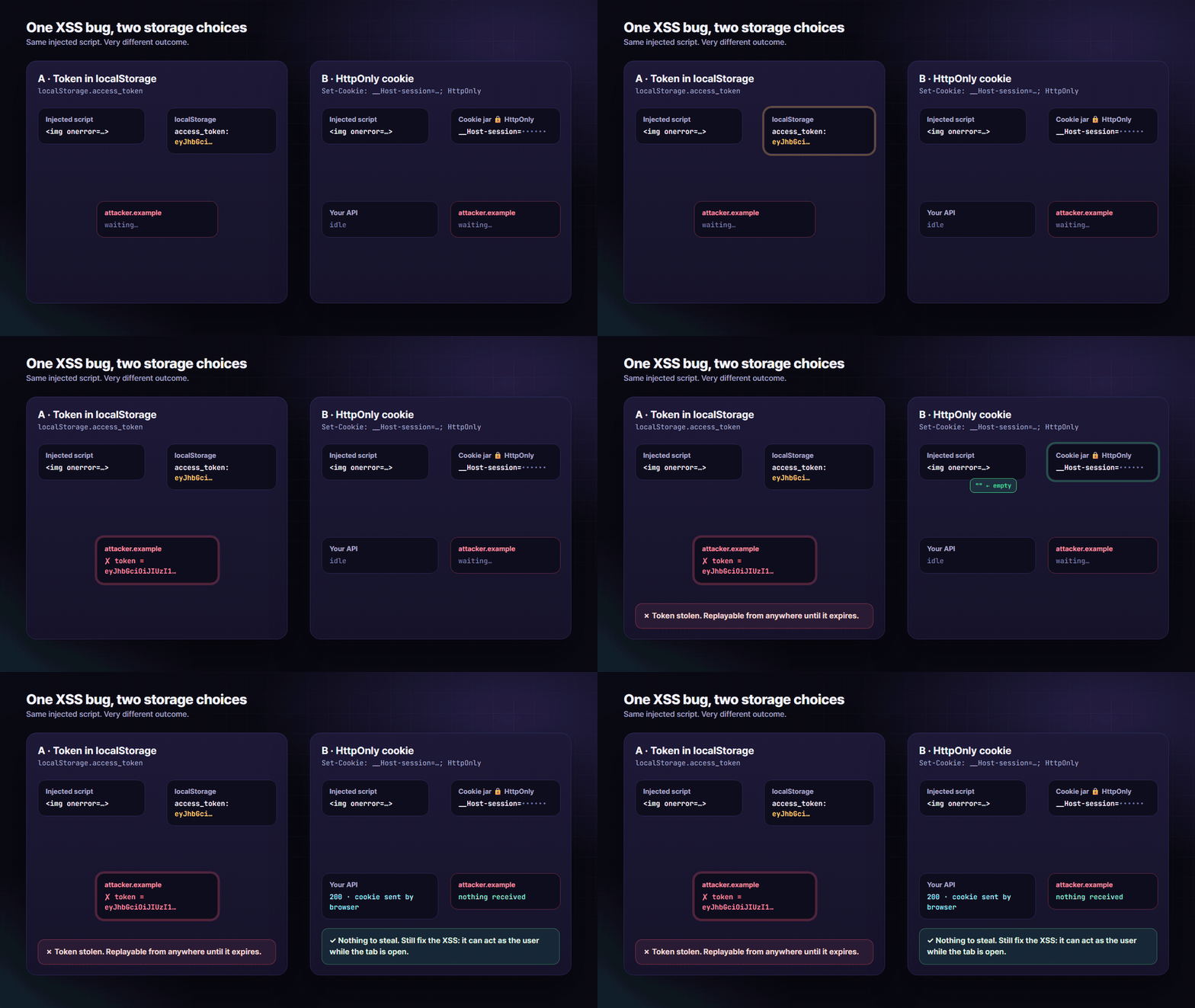
Token in localStorage or sessionStorage: any JavaScript running on your origin can call localStorage.getItem(). That includes an XSS payload, a compromised npm package or a hijacked analytics script. The token leaves the browser and can be replayed from the attacker’s own machine until it expires, long after the user has closed the tab.
Token in an HttpOnly cookie: the browser stores it and attaches it to matching requests, but no script can read it. document.cookie simply doesn’t include it. There is nothing to steal and nothing to replay elsewhere.
HTTP/1.1 204 No Content
Set-Cookie: __Host-session=9f2c…; Path=/; Secure; HttpOnly; SameSite=Lax; Max-Age=3600
Set-Cookie: __Host-refresh=71ab…; Path=/; Secure; HttpOnly; SameSite=Strict; Max-Age=1209600
HttpOnly: JavaScript can’t read it.Secure: only sent over HTTPS.SameSite: controls cross-site sending (section 2).__Host-prefix: the browser enforcesSecure,Path=/and noDomainattribute, so a sibling subdomain can’t overwrite it.
The client code gets simpler too:
// No Authorization header, no token handling in JS
const res = await fetch('/api/me', { credentials: 'include' });
Be honest about the limit. HttpOnly turns “attacker steals a session” into “attacker can act as the user while the page is open”. That’s a big improvement, but it isn’t a fix. The XSS still runs, and it can call your API with the user’s cookies. That’s why sections 3 and 4 still matter.
The patterns I actually ship, best first:
- Same-site API or backend-for-frontend (BFF): the browser only ever holds an HttpOnly session cookie, and the BFF holds any OAuth tokens on the server.
- Access token in memory + refresh token in an HttpOnly cookie. The access token is short-lived and kept in a JavaScript variable (not storage). The refresh cookie is scoped to the refresh endpoint and rotated on every use.
- Both tokens in HttpOnly cookies, if a migration makes (1) hard for now.
Mobile apps are different: there’s no cookie jar to lean on, so use the platform’s secure storage (Keychain on iOS, Keystore-backed storage on Android).
If your API is on another origin, CORS must allow credentials explicitly:
Access-Control-Allow-Origin: https://app.example.com
Access-Control-Allow-Credentials: true
Vary: Origin
You can’t use a * origin with credentials. Allow-list exact origins, and never reflect whatever Origin arrives.
Try the difference yourself. This demo only reads its own sandboxed values and sends nothing anywhere:
▶ Try it live: https://oriebalzyuot96.github.io/blog/front-end-security-2026/#demo-xss
2. CSRF: the price of cookies
Cookies are sent automatically, and that’s the point. It’s also the risk: another site can make the user’s browser send a request to your API, cookies included. That’s cross-site request forgery.
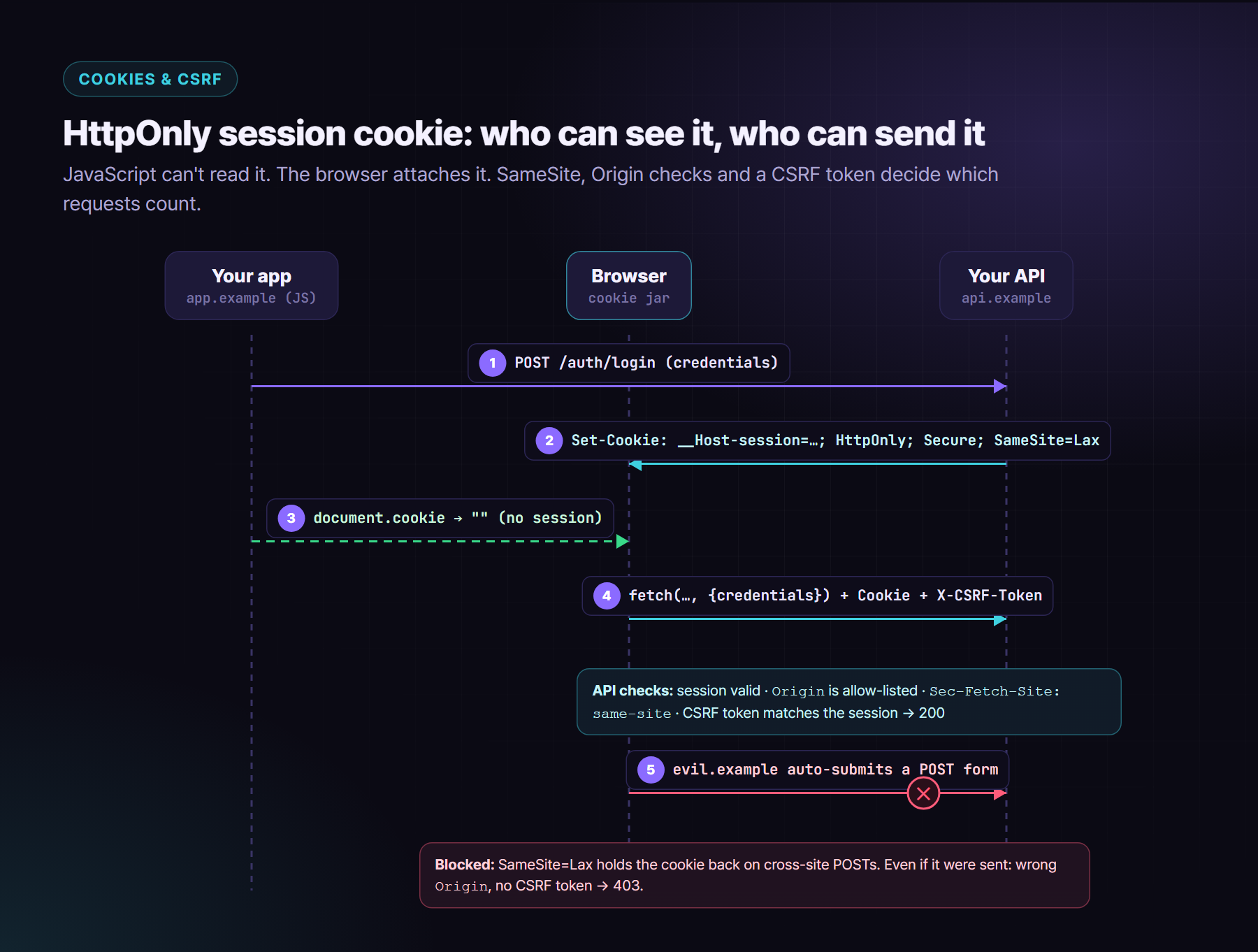
Layer your defences:
- Set
SameSiteexplicitly. Chromium treats cookies without the attribute asLax, but don’t rely on browser defaults.Laxstill sends cookies on top-level GET navigations, so never change state on GET. - Know “same-site” vs “same-origin”.
evil.example.comandapp.example.comare the same site, so SameSite doesn’t protect you from a compromised or taken-over sibling subdomain. Clean up dangling DNS records. SameSite=None(cross-site API) requiresSecureand makes a CSRF token mandatory.- Check
Originon every state-changing request against an allow-list. - Use Fetch Metadata. Modern browsers send
Sec-Fetch-Site. Rejectcross-sitefor anything that isn’t a public endpoint. - Use a CSRF token: a synchronizer token stored server-side, or a signed double-submit cookie bound to the session. The front end sends it in a header such as
X-CSRF-Token.
// Express-style middleware for state-changing routes
const ALLOWED = new Set(['https://app.example.com']);

export function csrfGuard(req, res, next) {
  if (['GET', 'HEAD', 'OPTIONS'].includes(req.method)) return next();

  const site = req.get('Sec-Fetch-Site');
  if (site && site !== 'same-origin' && site !== 'same-site') return res.sendStatus(403);

  const origin = req.get('Origin');
  if (!origin || !ALLOWED.has(origin)) return res.sendStatus(403);

  const token = req.get('X-CSRF-Token');
  if (!token || !timingSafeEqualStr(token, req.session.csrfToken)) return res.sendStatus(403);

  next();
}
3. XSS hygiene: where frameworks stop protecting you
Angular, React, Vue and Svelte escape text by default. XSS comes back through the escape hatches:
innerHTML,outerHTML,insertAdjacentHTML,document.write- React
dangerouslySetInnerHTML, Angular[innerHTML]withbypassSecurityTrustHtml, Vuev-html - URLs:
href={userUrl}that acceptsjavascript:(allow-listhttps:andmailto:) - Markdown or rich text rendered to HTML without sanitising
postMessagelisteners that don’t checkevent.origin- Server-rendered JSON dropped into a
<script>tag without escaping</script>
When you really must render HTML, sanitise it with a maintained library:
import DOMPurify from 'dompurify';

const clean = DOMPurify.sanitize(userHtml, {
  ALLOWED_TAGS: ['b', 'i', 'em', 'strong', 'a', 'p', 'ul', 'ol', 'li', 'br'],
  ALLOWED_ATTR: ['href'],
});
function safeHref(raw: string): string {
  try {
    const u = new URL(raw, location.origin);
    return ['https:', 'mailto:'].includes(u.protocol) ? u.href : '#';
  } catch {
    return '#';
  }
}
Review rule: every innerHTML-style sink needs a comment explaining where the HTML comes from and how it’s sanitised. Lint for the rest.
4. CSP and Trusted Types: the safety net
A Content Security Policy limits what can run even when a bug lets markup in. Allow-list-based policies tend to be bypassable. The current guidance is a strict, nonce-based policy:
Content-Security-Policy:
  script-src 'nonce-r4nd0mPerResponse' 'strict-dynamic';
  object-src 'none';
  base-uri 'none';
  frame-ancestors 'none';
  form-action 'self';
  require-trusted-types-for 'script';
  trusted-types app-sanitizer;
  report-to csp
Reporting-Endpoints: csp="https://reports.example.com/csp"
- Nonces are generated per response, never hard-coded at build time. A static site can use
'sha256-…'hashes of inline scripts instead. 'strict-dynamic'lets your trusted loader script load its chunks without listing every URL.frame-ancestors,report-uriandsandboxare ignored in a<meta>CSP. Send the policy as a real header.- Roll out with
Content-Security-Policy-Report-Onlyfirst, read the reports for a week or two, then enforce.
Trusted Types stop DOM XSS at the sink: once the policy is enforced, el.innerHTML = string throws unless the value came from a policy you defined:
const policy = window.trustedTypes?.createPolicy('app-sanitizer', {
  createHTML: (input) => DOMPurify.sanitize(input),
});

el.innerHTML = policy ? policy.createHTML(userHtml) : DOMPurify.sanitize(userHtml);
Chromium has supported Trusted Types for years, and other engines have been adding them. The directive is ignored where it isn’t supported, so it’s safe to ship as defence in depth.
5. Subresource Integrity
If you load anything from a CDN, pin its hash, so a compromised CDN file doesn’t run:
<script
  src="https://cdn.jsdelivr.net/npm/some-lib@4.2.1/dist/some-lib.min.js"
  integrity="sha384-…exact hash of that file…"
  crossorigin="anonymous"></script>
- SRI only works for immutable, versioned URLs. A “latest” URL will break the hash the next time it changes.
- Generate the hash from the file you reviewed:
openssl dgst -sha384 -binary file.js | openssl base64 -A. - Better still, self-host third-party code and let CSP do the rest.
6. Clickjacking
If your app can be framed, an attacker can overlay it with a decoy and trick users into clicking “Approve”. Send both headers: the modern directive, plus the legacy one for old clients:
Content-Security-Policy: frame-ancestors 'none'
X-Frame-Options: DENY
Use frame-ancestors 'self' https://partner.example if you really need to be embedded. Remember: this doesn’t work in a meta tag.
7. Encrypting route params: what it does and doesn’t do
Several products I’ve worked on encrypt ids in URLs, so /projects/10 becomes /projects/Xk3…. It has real benefits:
- ✅ Sequential ids don’t leak business volume, such as “we have 10,000 invoices”.
- ✅ Casual enumeration by editing the URL gets harder.
- ✅ Emails and reset tokens stay out of the address bar, browser history, analytics and shared screenshots.
But be clear about what it doesn’t do:
- ❌ It’s not authorization. The key ships in your JavaScript bundle, so anyone determined can decrypt and re-encrypt. The API must check, on every request, that this user may access this resource. Missing that check is an IDOR (broken object-level authorization), one of the most common API flaws.
- ❌ It’s not a substitute for opaque server-side ids, such as random UUIDs, if you don’t want ids to be guessable.
- ❌ It doesn’t make secrets in query strings safe. Prefer POST bodies, and set
Referrer-Policy: strict-origin-when-cross-originso full URLs don’t leak to third parties.
Two practical gotchas: keep OAuth callback params (code, state) in plain text, or the provider flow breaks. Old bookmarks with plain ids should still resolve, and still be authorized on the server.
8. Login hardening and rate limiting
- Rate limit on the server, per IP and per account, with progressive delays. Take the IP from the connection, or from a proxy header you configured to trust. Never take it from a value in the request body, or a client will just pick a new bucket each time.
- Prefer progressive friction to hard lockouts. A hard lockout after five failures lets anyone lock out your users. Use delays, then a CAPTCHA, then a temporary lock with notification.
- Use generic errors: “Email or password is incorrect”. Use the same response time and the same message for “no such user”.
- One-time codes expire quickly, are single-use, and are limited in attempts per code and per account.
- Offer phishing-resistant options: passkeys (WebAuthn) and authenticator apps, with recovery codes.
- Log failures, lockouts and unusual patterns, without passwords or full tokens.
9. Supply chain hygiene
Your bundle runs every dependency’s code with your users’ sessions.
- ✅ Commit lockfiles and install with
npm ciin CI. - ✅ Automate updates (Renovate or Dependabot), and review them. Don’t auto-merge majors.
- ✅ Run
npm auditor an equivalent scanner in CI, and triage instead of ignoring. - ✅ Disable install scripts where you can (
npm ci --ignore-scripts), and allow-list the packages that really need them. - ✅ Prefer packages with provenance and active maintenance. Remove what you no longer use.
- ✅ Keep third-party tags (analytics, chat widgets) to a minimum, and load them under CSP.
10. Secrets never belong in front-end env files
VITE_*, NEXT_PUBLIC_*, PUBLIC_* and Angular’s environment.ts are inlined into the bundle. Anyone can open DevTools and read them.
- Public by design (fine): reCAPTCHA site keys, Maps browser keys restricted by referrer, public analytics ids, publishable payment keys.
- Never in the front end: API secrets, CAPTCHA secret keys, database URLs, signing keys, service-account credentials.
- Encrypting values in localStorage doesn’t make them secret either, because the key is in the bundle. It only deters casual tampering.
- Turn on secret scanning in your repo and CI (for example gitleaks or your platform’s built-in scanner).
- Think about source maps in production. Upload them to your error tracker, and don’t serve them publicly if they expose internal code you’d rather not publish.
11. CAPTCHA: choosing one, or building your own
A CAPTCHA is a speed bump, not a wall. It raises the cost of automated abuse on login, sign-up, password reset and contact forms. It should sit on top of rate limiting, never replace it.
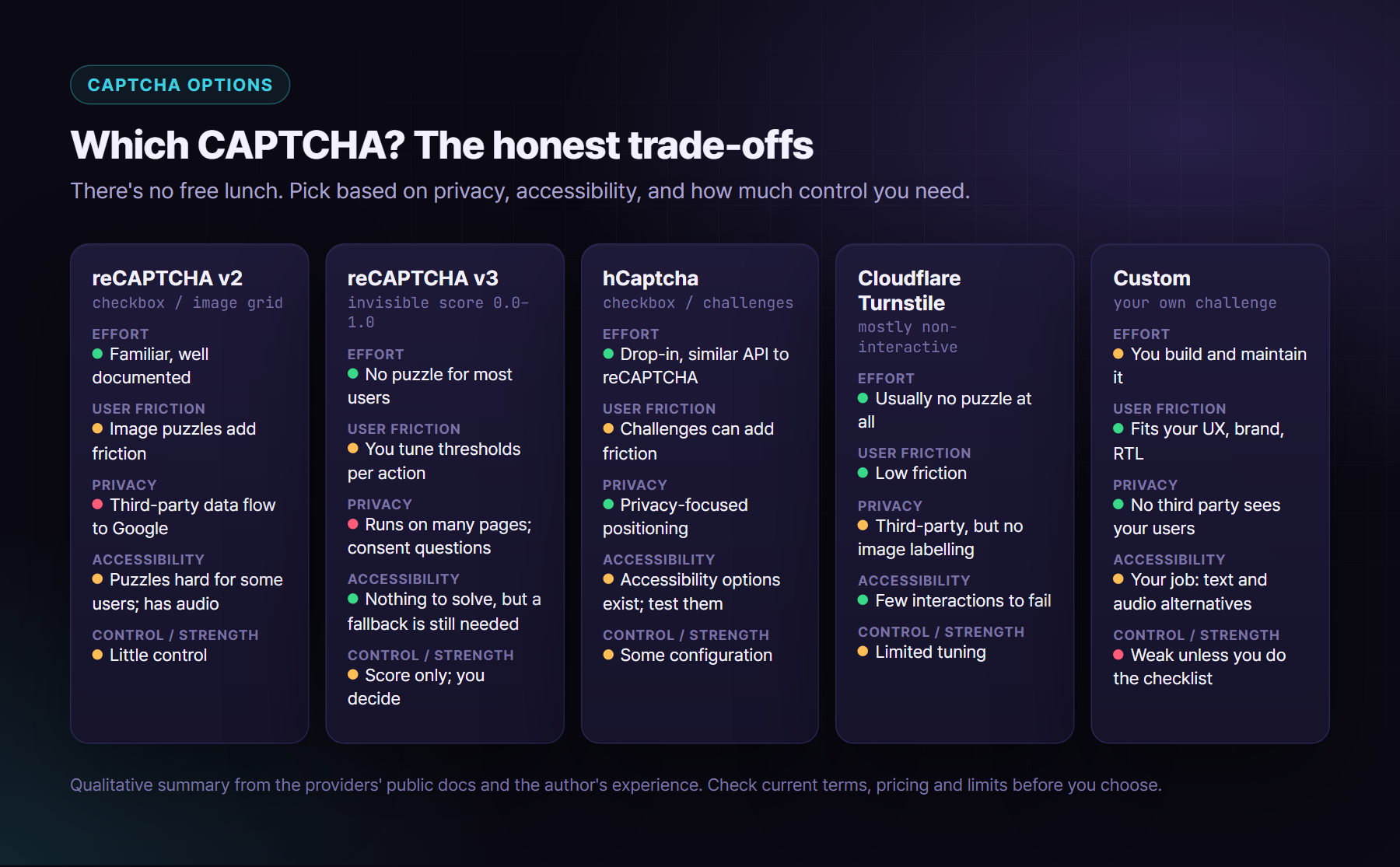
Google reCAPTCHA: v2 vs v3
- v2 (checkbox, or invisible) asks some users to solve image challenges. It’s familiar and easy to integrate. The friction falls hardest on users with visual, motor or cognitive disabilities, and the audio alternative isn’t easy for many people.
- v3 (score) shows no puzzle. It returns a score from 0.0 to 1.0 per action, and you choose what to do with it. Don’t just block low scores: step up instead (email OTP, a v2 challenge, manual review).
- Either way, verify on your server. Send the token to Google’s
siteverifyendpoint with your secret key. Tokens are short-lived (Google documents two minutes) and can be verified only once. For v3, also check thatactionandhostnamematch what you expect. - Privacy and GDPR. reCAPTCHA sends device and behaviour data to Google. Disclose it in your privacy policy and check with your DPO whether you need consent in your jurisdiction. Some organisations rule it out for this reason alone.
hCaptcha and Cloudflare Turnstile
- hCaptcha has a similar integration model and positions itself on privacy. It can still show challenges, so test them for accessibility.
- Turnstile aims to avoid puzzles for most visitors, using non-interactive checks. That’s fewer things for people to fail. It’s still a third-party service, so do the same privacy review.
- All of them: server-side verification with a secret key, an expiry on the token, and a plan for when the provider is down (fail closed for high-risk actions, fail open with tighter rate limits for low-risk ones).
Building a custom CAPTCHA
Teams build their own for privacy (no third party sees their users), for brand and Arabic/RTL fit, or because the threat is modest and the UX matters more. I’ve shipped one: small visual puzzles on a 3×3 board (“tap the odd shape out”, “tap the biggest shape”), where the client only ever sends back one cell index. It’s perfectly reasonable, if you get the server side right. The design rule fits in one sentence: the board and the answer live on the server, and the client only sends back a token and a move.
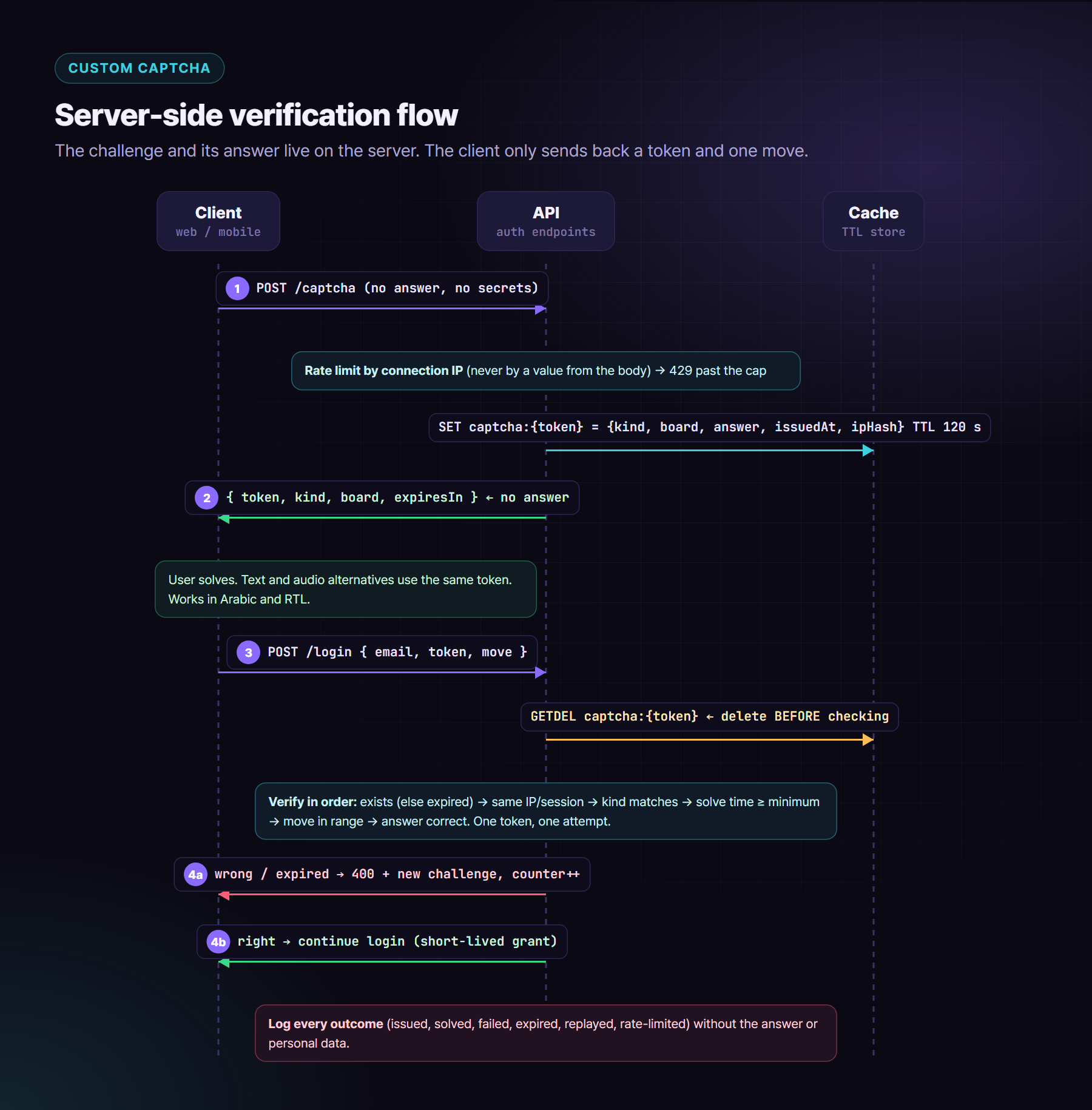
What to check in a custom CAPTCHA:
- ✅ Server-side verification only. The client never decides whether it passed. A “success” flag in the response that the client sends back is worthless.
- ✅ No answer in the DOM, the JS or the network response. Build the challenge response field by field, never by serialising the stored entry, so the answer can’t leak by accident. Check DevTools: if you can solve it from the Network tab, so can a bot.
- ✅ Single-use tokens with an expiry. Random, unguessable tokens, a short TTL (a minute or two), stored server-side.
- ✅ Replay protection: delete before you check. Remove the token first, then verify. If you delete only on success, a wrong answer leaves the token alive and a bot can try all nine cells with it.
- ✅ Bind the token to the session or IP (or a hash of it), so a solved token can’t be farmed on one machine and used on another.
- ✅ Bind it to the challenge type. Store the kind you issued, and reject a submission claiming an easier game.
- ✅ Minimum solve time. Anything faster than a human could manage is a bot.
- ✅ Validate the move. It must be an integer in range. For games with more than one right answer, re-derive the answer from the stored board instead of trusting a stored index.
- ✅ Rate limiting and lockout. Limit challenge issuance per IP (from the connection, not the body) and failed attempts per account, with progressive delays.
- ✅ Short-lived grants after success. For example, allow “resend code” without a new puzzle while that OTP is still valid. The grant expires with the code.
- ✅ An accessible alternative. Offer a text or audio option, or a different verification path such as an email link, and “try another puzzle” that goes easier, not harder. WCAG 2.2 SC 3.3.8 (Accessible Authentication, AA) allows object recognition, but don’t make a puzzle the only way in.
- ✅ Keyboard and screen reader support. Use a real grid of buttons with labels such as “Cell 5, circle”, a visible focus ring, and arrow-key movement.
- ✅ RTL and Arabic. Translate the instructions and every accessible name. Mirror the grid’s arrow-key behaviour in RTL. Don’t use text-reading challenges that only work in Latin script.
- ✅ Bot-resistance testing. Script a headless browser against it, try replaying tokens, try reading the answer from responses, and try brute-forcing all moves. Then fix what you find.
- ✅ Logging. Record issued, solved, failed, expired, replayed and rate-limited events, without answers or personal data, so you can see attacks and tune the limits.
The heart of the verification, in TypeScript (Node + Redis):
const MIN_SOLVE_MS = 800;

export async function verifyCaptcha(clientIp: string, body: { token: string; kind: string; move: unknown }) {
  // 1. Redeem first: one token, one attempt. GETDEL is atomic.
  const raw = await redis.getDel(`captcha:${body.token}`);
  if (!raw) return fail('expired');                         // also covers replay

  const c = JSON.parse(raw) as { kind: string; board: number[]; answer: number; issuedAt: number; ipHash: string };

  // 2. Same caller, same game
  if (c.ipHash !== hashIp(clientIp)) return fail('mismatch');
  if (c.kind !== body.kind) return fail('mismatch');

  // 3. Humans aren't that fast
  if (Date.now() - c.issuedAt < MIN_SOLVE_MS) return fail('too-fast');

  // 4. Validate the move, then check it against the stored board
  const move = body.move;
  if (typeof move !== 'number' || !Number.isInteger(move) || move < 0 || move > 8) return fail('invalid');
  if (!isWinningMove(c, move)) return fail('wrong');

  return ok({ grant: await issueShortGrant(clientIp) });
}
And the response that issues the challenge is built by hand, so the answer never travels:
return {
  token,
  kind: entry.kind,
  board: entry.board,          // what to draw
  expiresInSeconds: TTL_SECONDS,
  // no `answer`, no `success`, nothing the client could replay
};
The checklist
- ✅ Sessions in
__Host-cookies with HttpOnly, Secure and an explicit SameSite. No long-lived tokens in Web Storage. - ✅ CORS with exact origins and credentials, never
*. - ✅ CSRF: no state changes on GET, plus Origin,
Sec-Fetch-Siteand CSRF token checks. - ✅ No unsanitised HTML sinks,
javascript:URLs blocked,postMessageorigins checked. - ✅ Strict nonce- or hash-based CSP, rolled out in Report-Only mode first, with Trusted Types enforced.
- ✅ SRI on every CDN asset, or self-hosting.
- ✅
frame-ancestors 'none'andX-Frame-Options: DENY. - ✅ Route-param encryption treated as obfuscation, with object-level authorization on every API call.
- ✅ Server-side rate limits per IP and per account, generic login errors, passkeys or MFA available.
- ✅ Lockfiles,
npm ci, reviewed updates, scanners and minimal third-party tags. - ✅ Zero secrets in front-end env files, and secret scanning on.
- ✅ CAPTCHA verified on the server, single-use, expiring, bound, rate-limited, accessible, RTL-ready, tested and logged.
Security on the front end is mostly about refusing convenient shortcuts. Every item above is boring, and that’s exactly why attackers count on us skipping them.
About the author
Orieb Alzyuot (عريب الزيوت) is a Senior Front-End & UI/UX Engineer based in Amman, Jordan, with 6+ years of experience building government, fintech, HR and enterprise products used every day. Her work includes:
- Angular from AngularJS to v22 with Signals;
- React and React Native apps that share business logic with the web;
- custom design systems with multiple themes and accessibility modes;
- native-feeling Arabic RTL;
- AI-assisted engineering with Cursor and Claude Code.
Open to senior and lead front-end roles, contracts and freelance work, remote or with relocation.
Find me here:
- 🌐 Portfolio: https://oriebalzyuot96.github.io
- 📄 CV (PDF): https://oriebalzyuot96.github.io/Orieb-Alzyuot-CV.pdf
- 💼 LinkedIn: https://www.linkedin.com/in/orieb-alzyuot996
- 🐙 GitHub: https://github.com/oriebalzyuot96
- 💡 Stack Overflow: https://stackoverflow.com/users/13313528/orieb-alzyuot
- ⚡ StackBlitz: https://stackblitz.com/@oriebalzyuot96
- 🖊️ CodePen: https://codepen.io/oriebalzyuot96
- ✉️ Email: alzuotorieb9999@gmail.com
If this helped, follow me on Medium for more on design systems, accessibility, Angular, React and front-end architecture. 💜