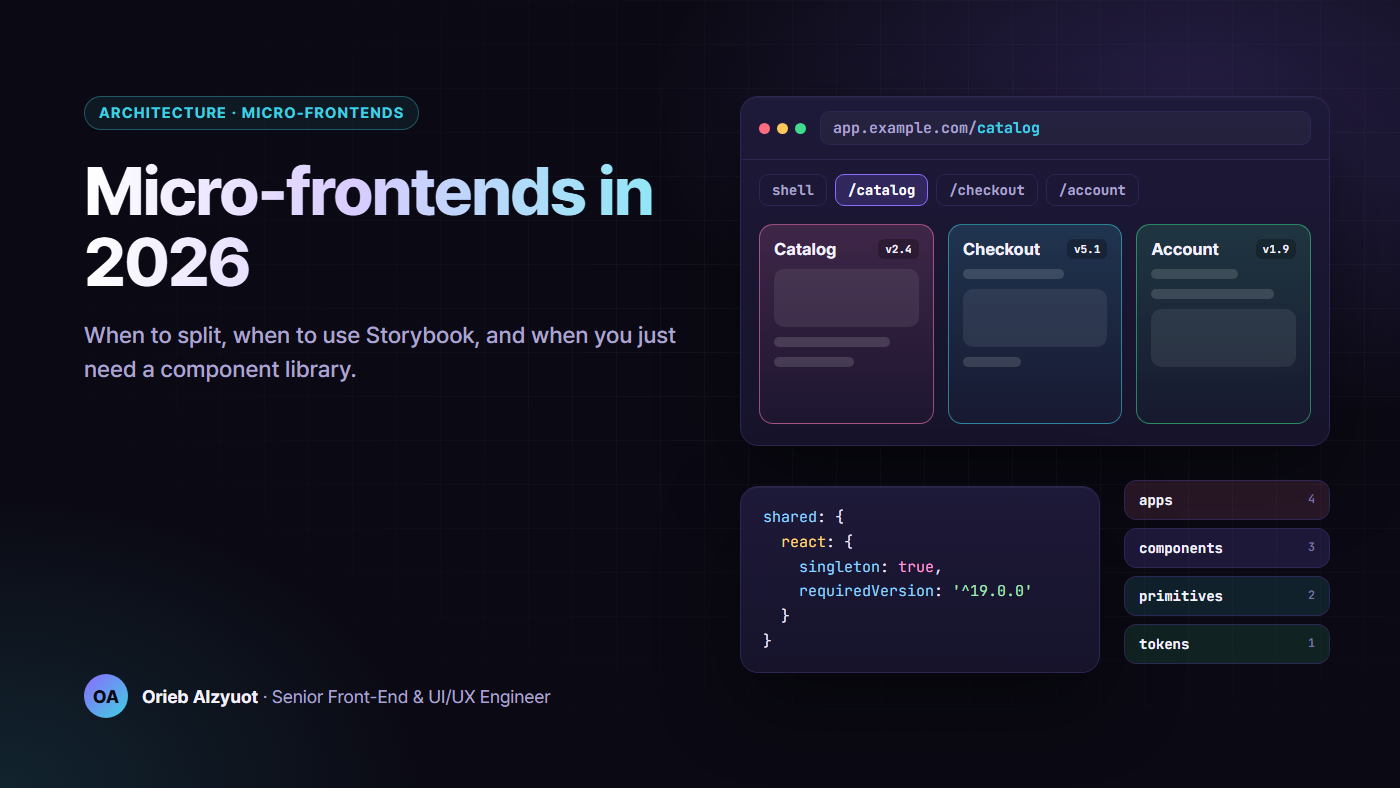
Micro-Frontends in 2026: When to Split, When to Use Storybook, and When You Just Need a Component Library
Most teams that ask for micro-frontends don’t have a runtime problem. They have an ownership problem, a release problem or a consistency problem, and each one has a cheaper fix. Here’s how I decide.
I’ve worked on both sides of this. I’ve helped split a legacy front end into independently deployed pieces, and I’ve talked teams out of splitting when a shared component library and a monorepo would solve their pain in a tenth of the time.
This is the decision guide I wish I’d had: what the options really are in 2026, when splitting pays off, what it costs, where Storybook fits, and when “we need micro-frontends” really means “we need a design system.”
TL;DR
- Micro-frontends solve an organisational problem: many teams that need to ship on their own schedule. If you have one or two teams, you almost certainly don’t need them.
- Split the repo before you split the runtime. An Nx or Turborepo monorepo with enforced module boundaries gives you most of the autonomy at none of the runtime cost.
- If you do split, pick the boundary deliberately: Module Federation 2.0 for build-integrated JS apps, Native Federation for Angular and Vite, import maps for standards-based loading, Web Components for framework-neutral contracts, and server composition when HTML is the product.
- Budget for the costs up front: duplicate dependencies, version skew, design drift, cross-app routing and auth, observability and contract tests.
- Storybook is for shared UI, not for every app. Use it when components are consumed by more than one team, and wire it into CI with interaction, accessibility and visual tests.
- Consistency comes from a component library, built as tokens, then headless primitives, then styled components, and published with real versioning.
1. What micro-frontends are, and the 2026 landscape
A micro-frontend is a slice of the UI that one team builds, tests and deploys on its own, and that is composed with other slices at runtime (or at the edge) into what users see as one product. The independent deploy is the defining part. If everything ships together from one pipeline, you have a modular app, which is often better.
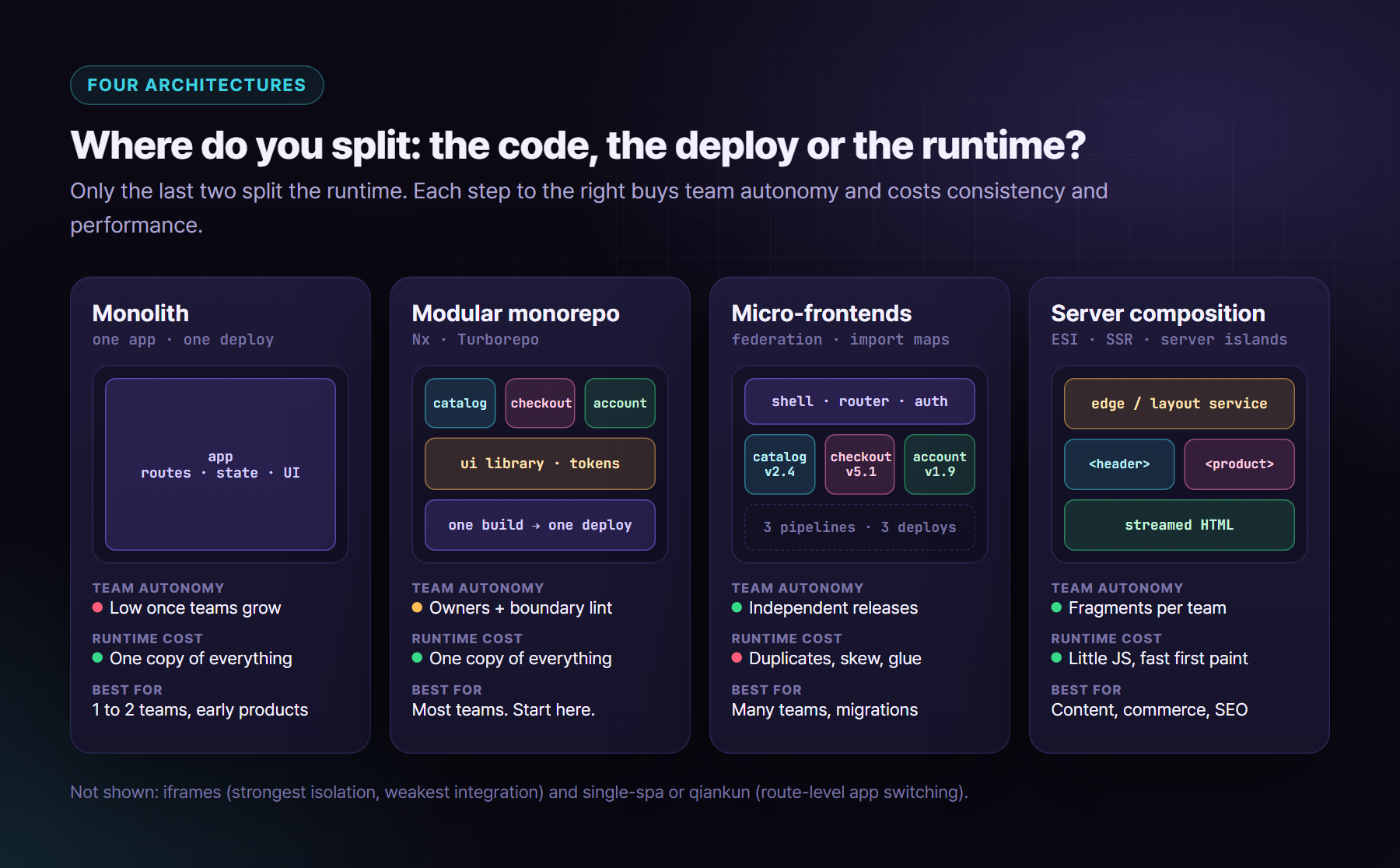
Here are the composition options worth knowing in 2026.
Module Federation 2.0 (Webpack and Rspack). Federation lets a host load code that a remote exposes, and share libraries like React between them. Version 2 lives in the @module-federation/* packages. It adds a manifest (mf-manifest.json), a runtime API with plugins, type hints for remotes, and Chrome DevTools support. It runs on Webpack, Rspack and Rsbuild, and there’s a Vite plugin too. It’s the most complete toolkit if your apps are bundled JavaScript.
Native Federation (Angular and Vite). Native Federation is the same mental model built on browser standards: ES modules plus import maps. It’s the usual choice for Angular now that the CLI builds with esbuild, and it works with Vite.
Import maps. Import maps are a browser feature that maps bare specifiers like react to URLs. On their own they give you “load this exact version of that remote from that URL” with no bundler runtime, which is great for shells and for sharing one copy of a library.
Web Components as the integration boundary. Wrap each micro-frontend in a custom element: attributes and properties go in, DOM events come out. The host doesn’t care if the inside is React, Angular or Vue. This is the most framework-neutral contract you can get.
Server and edge composition. If your pages are mostly content, compose them on the server. Options include Edge Side Includes (<esi:include>) on a CDN, SSR fragments streamed by a layout service, and Astro’s server islands (server:defer). Users get HTML fast, and teams still own their fragments.
iframes. iframes give you the strongest isolation and the worst integration: no shared styles, awkward focus and history, and a lot of postMessage plumbing. They’re still fine for embedding a truly separate tool, like an admin console or a third-party widget.
Routing-level composition (single-spa, qiankun). A root config mounts and unmounts whole apps based on the URL. single-spa is framework-agnostic. qiankun builds on it and adds JS and style sandboxing. This works well during migrations, where “one route, one app” is a natural boundary.
The alternative: Nx or Turborepo monorepos. Many packages, clear owners, cached builds, affected pipelines, and lint rules that stop one team importing another team’s internals. You deploy one app, so there is one copy of React, one router and one design-system version. That’s why I treat this as the default.
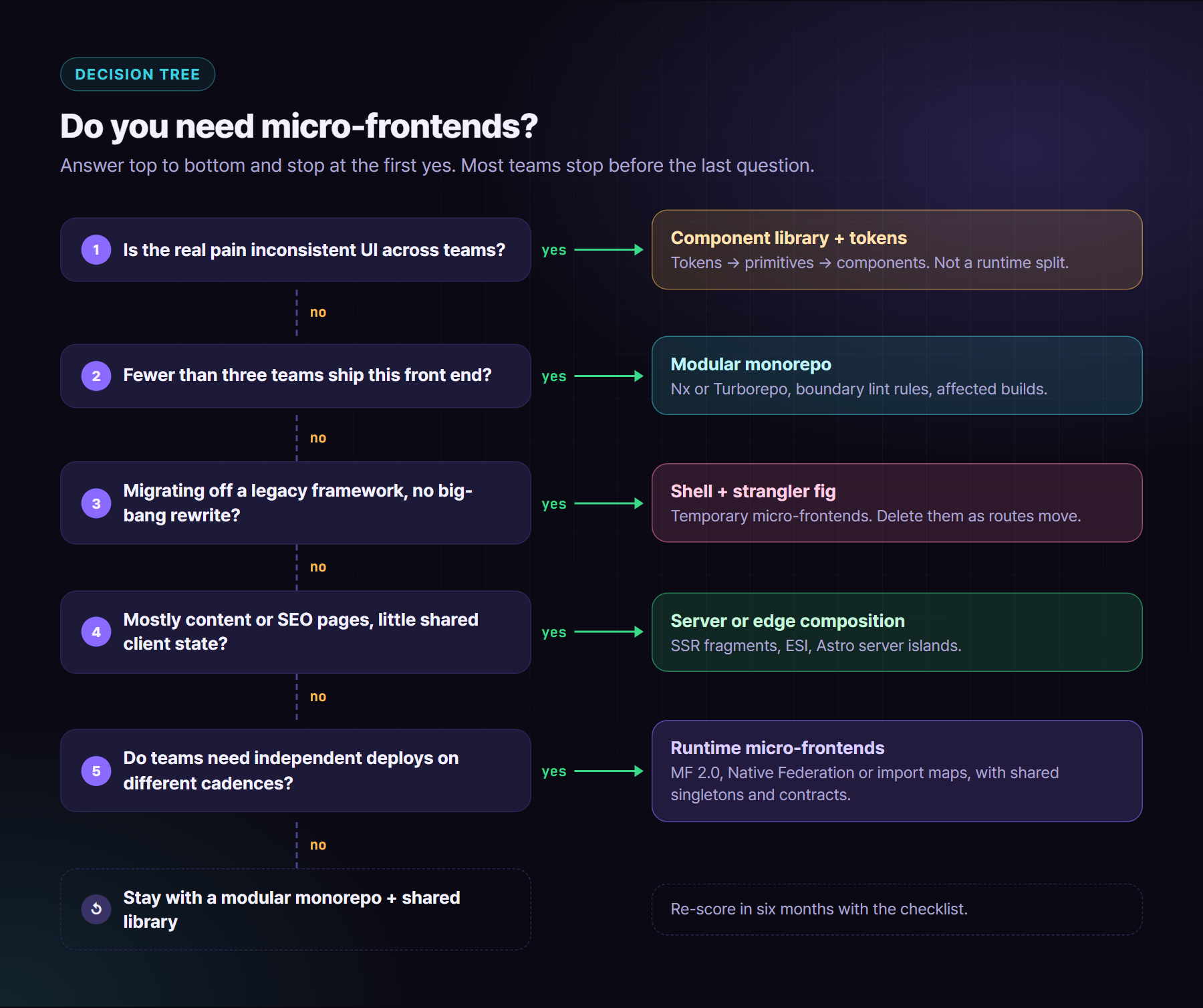
2. When to go micro-frontend: a decision framework
Signals for splitting the runtime:
- Many autonomous teams (roughly five or more) work on one product and keep blocking each other’s releases.
- Release cadence really differs. Checkout ships daily, reporting ships monthly, and a shared pipeline makes everyone wait for the slowest.
- Legacy migration. You’re replacing an old front end piece by piece with the strangler fig pattern, and you can’t freeze features for a rewrite.
- Mixed frameworks during a migration. AngularJS, modern Angular and React have to live on one page for a while.
Signals against:
- One or two teams. The coordination you’d save is smaller than the platform you’d have to build.
- Heavy shared state. If every screen reads the same cart, user and permissions, and they change together, the boundaries will leak.
- Performance budget pressure, especially on mobile or in markets with slower networks.
- A small product, or a product still searching for its shape. Boundaries drawn too early are expensive to move.
I score it before anyone writes a config. Give each statement +2 if it’s clearly true and 0 if not:
- ✅ We have five or more teams shipping UI into the same product.
- ✅ Teams are regularly blocked by another team’s release.
- ✅ Parts of the product have clearly different release cadences.
- ✅ We are migrating off a legacy framework and can’t do a big-bang rewrite.
- ✅ Domains are well separated: few screens need data owned by three or more teams.
- ✅ We have (or will fund) a platform team for the shell, CI and observability.
Then subtract 2 for each of these:
- ✅ One or two teams own the whole front end.
- ✅ Most pages depend on the same shared, fast-changing state.
- ✅ We have a strict JS budget, such as under 170 KB gzipped on mobile.
- ✅ Our real complaint is inconsistent UI, not slow releases.
Score 6 or more: runtime micro-frontends are worth a pilot. Score 1 to 5: go with a modular monorepo and a shared library, then re-score in six months. Score 0 or below: fix the component library and the CI pipeline first.
3. The costs, and how to keep them small
Duplicated dependencies. Each remote can bring its own React, date library and design system. Fix: share them as singletons and agree on supported version ranges.
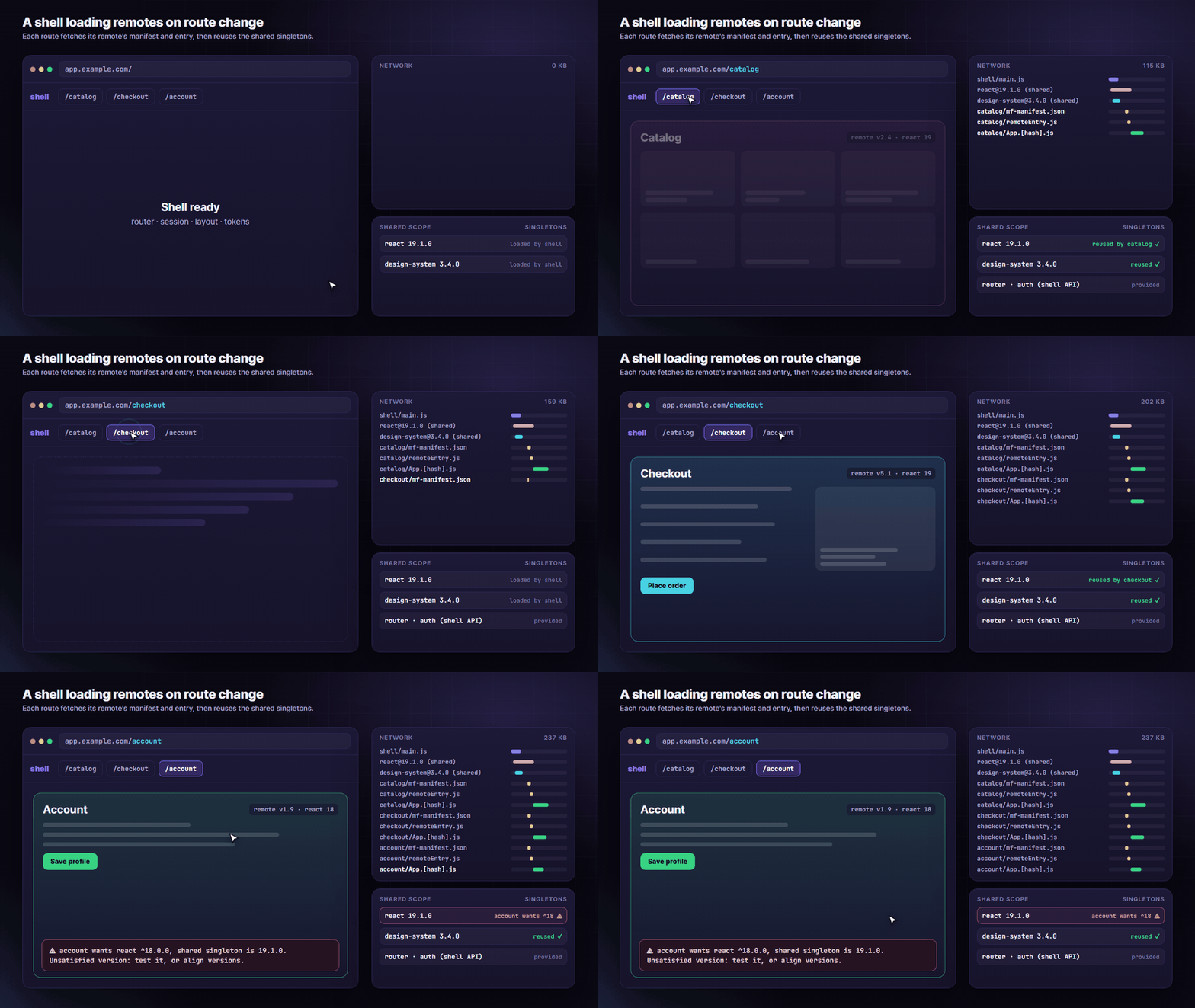
Version skew. Singletons fix size, but a remote built against React 18 can end up running on React 19. Fix: a compatibility matrix owned by the platform team, requiredVersion ranges, and a CI check that fails when a remote’s range drifts from the shell’s.
Design-system drift. Two teams on two design-system majors means two button styles on one page. Fix: a design-token package every remote consumes, plus the design system as a shared singleton with a deprecation window.
Cross-app routing and auth. Fix: the shell owns top-level routes, the session and the login redirect. Remotes own their sub-routes and get the user through a small, versioned API, never by reading tokens themselves.
Observability. “The page is broken” now means “which remote, which version?” Fix: tag every error and performance event with the remote name and version, and send them to the same place.
Testing contracts. Fix: test each remote’s public contract (props, attributes, events, exposed modules) in its own pipeline, plus a few smoke tests of the composed app.
Bundle and performance budgets. Fix: a budget per remote and one for the composed route, enforced in CI, and lazy-load remotes per route.
Here’s a Module Federation 2.0 remote config for Rspack. Webpack uses the same options through @module-federation/enhanced/webpack:
// rspack.config.ts (catalog remote)
import { ModuleFederationPlugin } from '@module-federation/enhanced/rspack';

export default {
  // ...entry, module rules, etc.
  plugins: [
    new ModuleFederationPlugin({
      name: 'catalog',
      filename: 'remoteEntry.js',
      exposes: {
        './App': './src/App.tsx',
        './ProductCard': './src/components/ProductCard.tsx',
      },
      shared: {
        react: { singleton: true, requiredVersion: '^19.0.0' },
        'react-dom': { singleton: true, requiredVersion: '^19.0.0' },
        '@acme/design-system': { singleton: true, requiredVersion: '^3.2.0' },
      },
      dts: true, // generate type hints that the host can pull
    }),
  ],
};
The host lists the remote, ideally pointing at its manifest, and lazy-loads it per route:
// host: rspack.config.ts
new ModuleFederationPlugin({
  name: 'shell',
  remotes: { catalog: 'catalog@https://cdn.example.com/catalog/mf-manifest.json' },
  shared: { react: { singleton: true }, 'react-dom': { singleton: true } },
});

// host: routes.tsx
const Catalog = React.lazy(() => import('catalog/App'));
For Angular, Native Federation keeps the same idea with standards underneath. Run ng add @angular-architects/native-federation on the shell and each remote. The schematic writes a federation.config file like this one (the exact file name and module format depend on the version):
// federation.config.js (catalog remote)
const { withNativeFederation, shareAll } = require('@angular-architects/native-federation/config');

module.exports = withNativeFederation({
  name: 'catalog',
  exposes: { './routes': './projects/catalog/src/app/catalog.routes.ts' },
  shared: { ...shareAll({ singleton: true, strictVersion: true, requiredVersion: 'auto' }) },
  skip: ['rxjs/ajax', 'rxjs/fetch', 'rxjs/testing', 'rxjs/webSocket'],
});
// shell: app.routes.ts
import { loadRemoteModule } from '@angular-architects/native-federation';

export const routes: Routes = [
  { path: 'catalog', loadChildren: () => loadRemoteModule('catalog', './routes').then(m => m.CATALOG_ROUTES) },
];
Without any federation tooling, an import map can pin versions per remote. Scopes let one legacy remote keep its own React while everything else shares one copy:
<script type="importmap">
{
  "imports": {
    "react": "/vendor/react@19.1.0/index.js",
    "react-dom/client": "/vendor/react-dom@19.1.0/client.js",
    "@acme/catalog": "/remotes/catalog/2.4.1/index.js",
    "@acme/account": "/remotes/account/1.9.0/index.js"
  },
  "scopes": {
    "/remotes/account/": { "react": "/vendor/react@18.3.1/index.js" }
  }
}
</script>
<script type="module">import('@acme/catalog').then(m => m.mount(document.querySelector('#app')));</script>
Older browsers needed a single import map placed before any module script. Recent Chromium versions can merge several maps, but check your support matrix before relying on that.
Here is a Web Component wrapper, so the host only sees a custom element:
// catalog/src/element.tsx
import { createRoot, type Root } from 'react-dom/client';
import { CatalogApp } from './App';

class CatalogElement extends HTMLElement {
  static observedAttributes = ['locale', 'category'];
  #root?: Root;

  connectedCallback() { this.#root = createRoot(this); this.#render(); }
  attributeChangedCallback() { this.#render(); }
  disconnectedCallback() { this.#root?.unmount(); this.#root = undefined; }

  #render() {
    this.#root?.render(
      <CatalogApp
        locale={this.getAttribute('locale') ?? 'en'}
        category={this.getAttribute('category') ?? undefined}
        onAddToCart={item => this.dispatchEvent(new CustomEvent('cart:add', { detail: item, bubbles: true, composed: true }))}
      />,
    );
  }
}
if (!customElements.get('acme-catalog')) customElements.define('acme-catalog', CatalogElement);
Angular has the same idea built in through createCustomElement from @angular/elements.
Event bus or shared store? Use a shared store only for state that is truly global and rarely changes: the current user, locale and feature flags, owned by the shell. Everything else should be events: “item added”, “session changed”. Events keep remotes decoupled, and you can version them like an API:
// @acme/mfe-events: a tiny, typed, versioned event bus
type Events = {
  'cart:item-added@1': { sku: string; qty: number };
  'auth:session-changed@1': { userId: string | null };
  'nav:navigate@1': { to: string };
};

const bus: EventTarget = ((globalThis as any).__acmeBus ??= new EventTarget());

export function emit<K extends keyof Events>(type: K, detail: Events[K]) {
  bus.dispatchEvent(new CustomEvent(type, { detail }));
}

export function on<K extends keyof Events>(type: K, handler: (detail: Events[K]) => void) {
  const listener = (e: Event) => handler((e as CustomEvent<Events[K]>).detail);
  bus.addEventListener(type, listener);
  return () => bus.removeEventListener(type, listener); // call this when the remote unmounts
}
The @1 suffix matters. When the payload has to change, publish @2 next to @1, migrate the listeners, and remove @1 only after every consumer has moved.
Watch how a shell loads remotes as the route changes, and where a skewed remote shows up:
Now try it. Turn remotes on and off, change their framework and design-system versions, and switch sharing strategies:
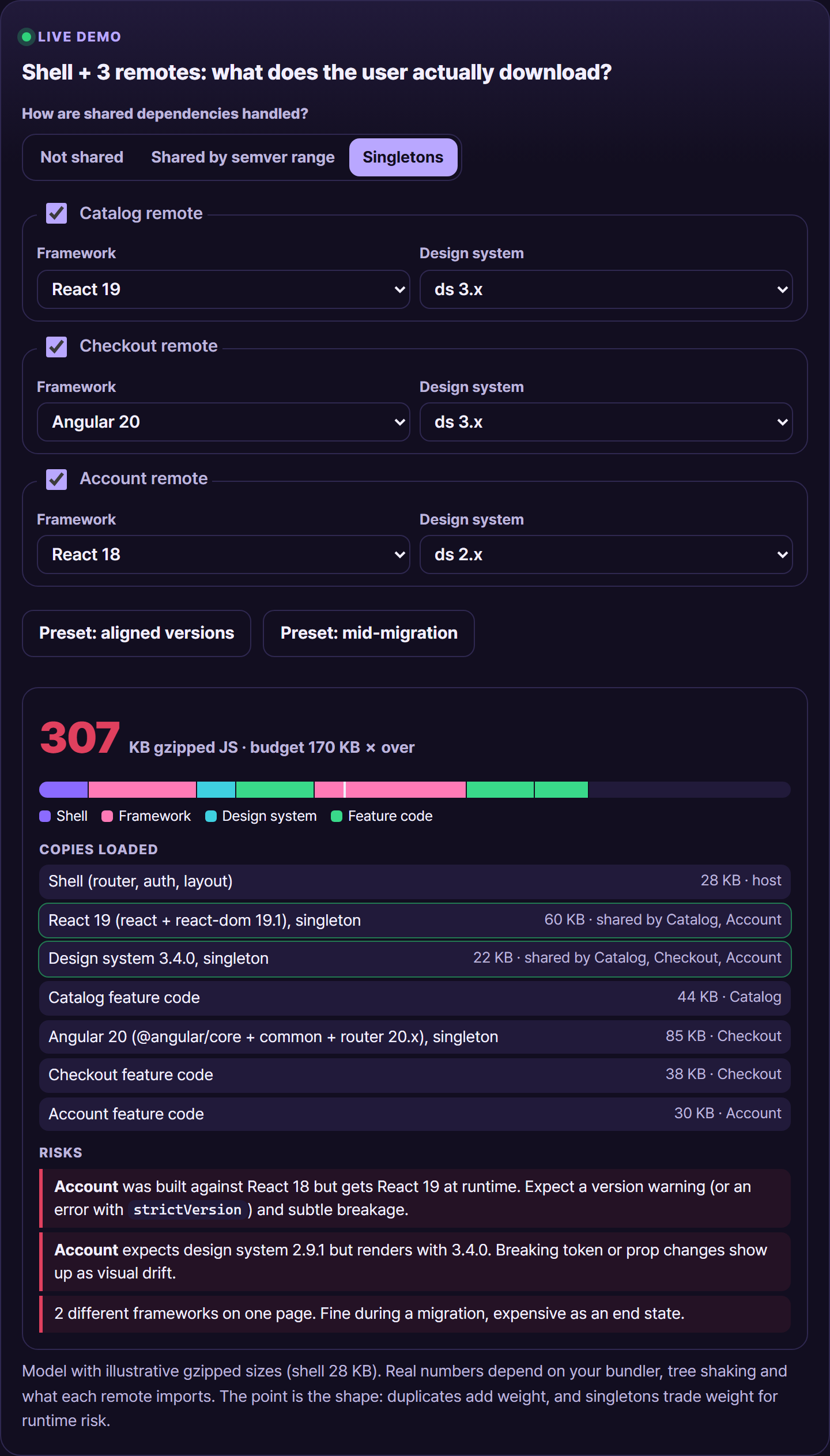
▶ Try it live: https://oriebalzyuot96.github.io/blog/micro-frontends-2026/#demo-mfe
4. A migration story pattern: the strangler fig
This is the pattern I’ve seen work, told generically. A large AngularJS app has to move to modern Angular, and a few new areas will be built in React. Freezing features for a year isn’t an option.
- Put a shell in front. It’s a thin modern app that owns the layout, the session, the top-level router and the design tokens. On day one it does almost nothing except mount the legacy AngularJS app as one big “remote” under
/*. - Carve out one route. The new
/reportsarea is built in modern Angular and loaded through Native Federation. The shell’s router sends/reports/*to it and everything else to legacy. - Hand off routing cleanly. Only one router owns each URL prefix. The legacy app must stop redirecting unknown URLs to its own home page, and every cross-app link goes through the shell’s
navigate, either directly or as anav:navigate@1event. Two routers fighting overpopstateis the most common bug in this phase. - Share the look before you share code. Both old and new apps load the same token package (CSS custom properties), so a legacy screen and a new screen look like one product while the code underneath is very different.
- Repeat, then delete. Each quarter, more routes move. When the last one leaves, the legacy remote is deleted, and often the federation goes with it. Many teams end up back in a modular monorepo, which is a success, not a failure.
The point is that micro-frontends were the migration tool, not the destination.
5. When to use Storybook (v8, v9 and beyond)
Storybook earns its place when components are shared: a design system, or UI that several teams consume. It gives you:
- Component-driven development: build each state on its own, including the edge cases that are hard to reach in the app.
- Docs:
autodocsturns stories and types into a living reference. - Interaction tests:
playfunctions click and type like a user, then assert. In Storybook 9 they can run through the Vitest addon, in a real browser. - Accessibility checks: the a11y addon runs axe on every story, and can fail the test run instead of just showing a panel.
- Visual regression: Chromatic, or your own Playwright screenshot tests against the built Storybook.
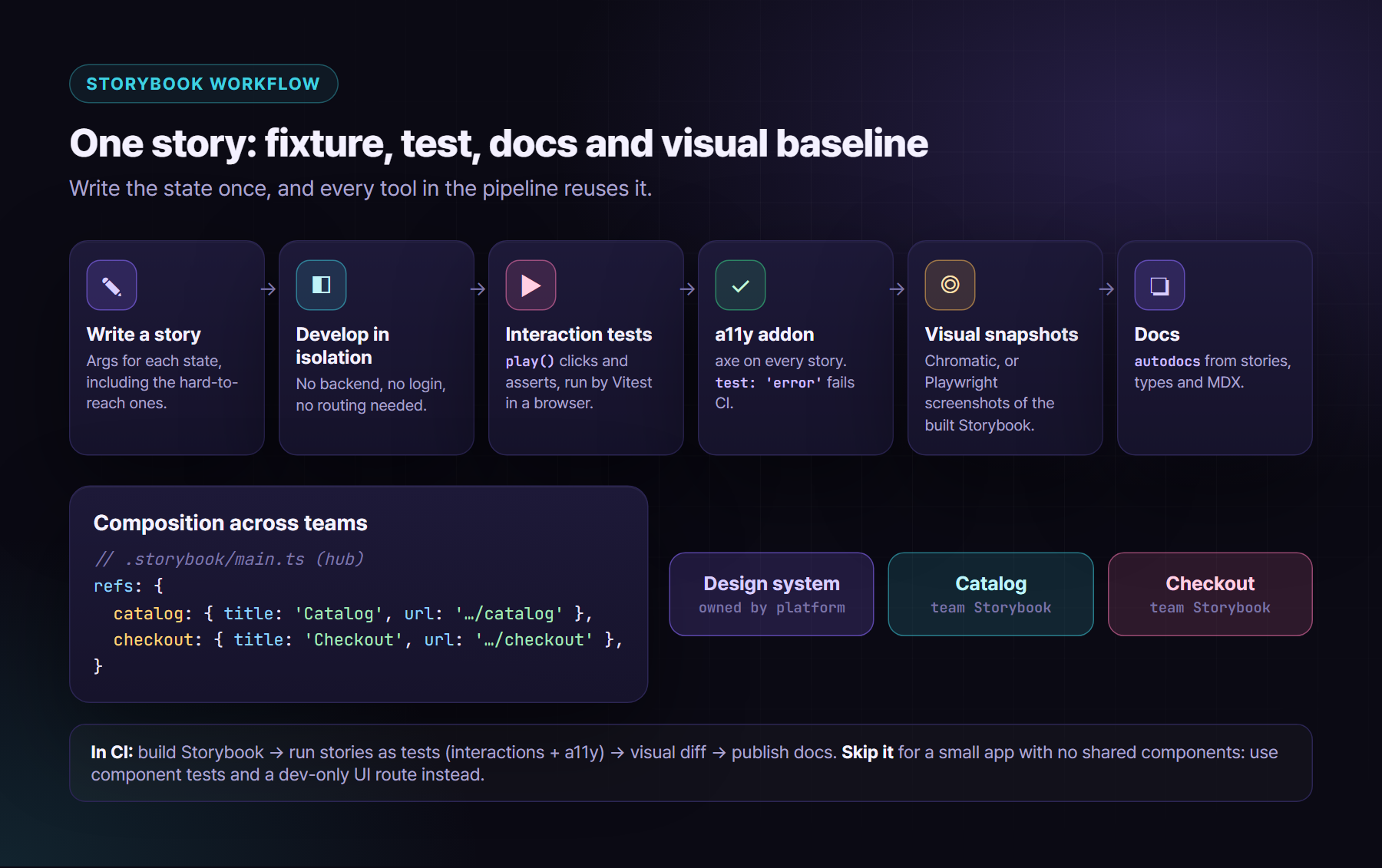
A story with an interaction test and a strict a11y check looks like this. It uses Storybook 9 imports. In v8 the test helpers come from @storybook/test instead of storybook/test, and the framework package names differ slightly:
// AddToCart.stories.tsx
import type { Meta, StoryObj } from '@storybook/react-vite';
import { expect, fn } from 'storybook/test';
import { AddToCart } from './AddToCart';

const meta = {
  component: AddToCart,
  args: { sku: 'SKU-42', onAdd: fn() },
  parameters: { a11y: { test: 'error' } }, // fail the run on axe violations
  tags: ['autodocs'],
} satisfies Meta<typeof AddToCart>;
export default meta;

type Story = StoryObj<typeof meta>;

export const IncreasesQuantityAndAdds: Story = {
  play: async ({ canvas, userEvent, args }) => {
    await userEvent.click(canvas.getByRole('button', { name: /increase quantity/i }));
    await userEvent.click(canvas.getByRole('button', { name: /add to cart/i }));
    await expect(args.onAdd).toHaveBeenCalledWith({ sku: 'SKU-42', qty: 2 });
    await expect(canvas.getByRole('status')).toHaveTextContent(/added/i);
  },
};
Composition across micro-frontends. Each team publishes its own Storybook, and a central one pulls them in with refs in .storybook/main.ts, for example refs: { catalog: { title: 'Catalog', url: 'https://storybook.example.com/catalog' } }. People get one place to browse, and teams keep their own builds.
When Storybook is overkill: a small app, one team, and no components shared outside the app. Storybook is another build to maintain and upgrade. Instead, use component tests (Vitest Browser Mode, Playwright component testing, or Testing Library), a single /dev/ui route that shows your components, and Playwright screenshots of real pages. Add Storybook when the second consumer appears.
6. Component library, design system or micro-frontend?
These three get mixed up all the time:
- A component library is versioned code: buttons, inputs, dialogs.
- A design system is the library plus tokens, guidelines, content rules, accessibility standards and the people who own them.
- A micro-frontend is a deployable slice of a product.
If your complaint is “every team’s UI looks and behaves differently”, the answer is the first two, not the third. Splitting the runtime actually makes consistency harder.
Build the library in layers, and stop at the layer you need:
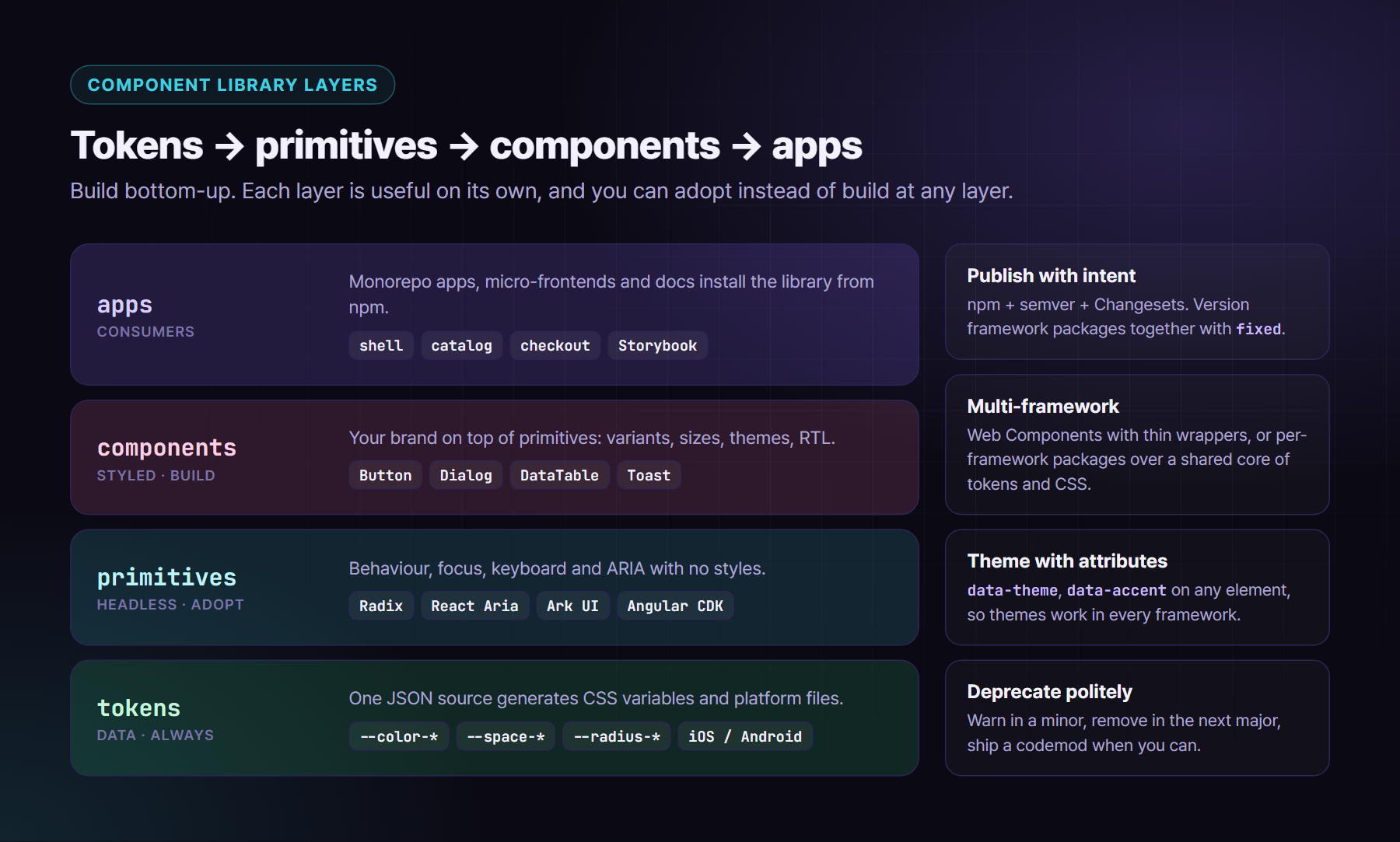
- Tokens package. Colours, spacing, type, radius and motion as data, generated into CSS custom properties (and native files if you have mobile apps). This alone fixes most visual drift, even across frameworks and micro-frontends.
- Headless primitives. Behaviour, focus management, keyboard support and ARIA, with no styles. This is the hardest layer to get right, so it’s the one I’m most likely to adopt.
- Styled components. Your brand on top of the primitives, with variants and theming driven by tokens.
Build vs adopt. For headless primitives, adopt: Radix Primitives or React Aria for React, Ark UI (built on Zag state machines) for React, Vue, Solid and Svelte, and the Angular CDK for Angular. For a full styled kit when your brand is flexible, look at MUI, PrimeNG or Angular Material. Build your own styled layer when brand, RTL quality or accessibility requirements go beyond what you can theme.
Multi-framework delivery has two honest options. One is to ship Web Components once and wrap them thinly per framework. The other is per-framework packages over one shared core of tokens and CSS. This is the route I took with my open-source library, Pelagic UI (npm i pelagic, code at https://github.com/oriebalzyuot96/pelagic-ui). It ships native packages for React, Vue, Svelte, Astro, Angular and React Native over a shared @pelagic-ui/core. Themes are data attributes (data-theme, data-accent, data-shape), so they work in every framework and can be scoped to any element. All 21 themes come from one source file, and the test suite checks 525 WCAG contrast pairs on every build. The lesson: share tokens and CSS, not runtime components, and consistency survives any architecture.
Publishing. Use npm (public or a private registry), semver that you actually respect, and Changesets so every PR declares its impact and the release writes the changelog. Version framework packages together so “v3.4 of the button” means the same thing everywhere. This goes in .changeset/config.json:
{
  "$schema": "https://unpkg.com/@changesets/config@3.1.1/schema.json",
  "changelog": "@changesets/cli/changelog",
  "commit": false,
  "fixed": [["@acme/ui-core", "@acme/ui-react", "@acme/ui-vue", "@acme/ui-angular"]],
  "linked": [],
  "access": "public",
  "baseBranch": "main",
  "updateInternalDependencies": "patch",
  "ignore": ["@acme/ui-docs"]
}
Developers run npx changeset in their PR. CI runs changeset version and changeset publish, often through the Changesets GitHub Action that opens a “Version Packages” PR. Pair it with a deprecation policy, such as “deprecated in one minor, removed in the next major, with a codemod when we can”, and the library stops being the thing everyone is afraid to upgrade.
7. What I’d do
If I joined your team tomorrow:
- ✅ Score it first with the checklist in section 2. Write the score in an ADR.
- ✅ Start with a modular monorepo (Nx or Turborepo), with module-boundary lint rules and
affectedbuilds. Most teams stop here, happily. - ✅ Ship a tokens package before any component work. It’s the cheapest consistency you’ll ever buy.
- ✅ Adopt headless primitives, build the styled layer, and publish with Changesets and a deprecation policy.
- ✅ Add Storybook when a second team consumes your components, with play-function tests, the a11y addon set to fail, and visual snapshots in CI.
- ✅ Split the runtime only for autonomy or migration. Use Module Federation 2.0 for bundled JS apps, Native Federation for Angular, import maps for simple shells, and Web Components when frameworks differ.
- ✅ Before the first remote ships, agree on shared singletons and version ranges, a versioned event contract, shell-owned routing and auth, per-remote budgets, and error tags that include remote name and version.
- ✅ Plan the exit. In a migration, the federation is scaffolding. Measure progress by how much of the legacy remote you’ve deleted.
Micro-frontends are a great tool for a specific problem: many teams, one product, different speeds. For everything else, a good component library and a well-run monorepo will get you further, faster, and with one copy of React.
About the author
Orieb Alzyuot (عريب الزيوت) is a Senior Front-End & UI/UX Engineer based in Amman, Jordan, with 6+ years of experience building government, fintech, HR and enterprise products used every day. Her work includes:
- Angular from AngularJS to v22 with Signals;
- React and React Native apps that share business logic with the web;
- custom design systems with multiple themes and accessibility modes;
- native-feeling Arabic RTL;
- AI-assisted engineering with Cursor and Claude Code.
Open to senior and lead front-end roles, contracts and freelance work, remote or with relocation.
Find me here:
- 🌐 Portfolio: https://oriebalzyuot96.github.io
- 📄 CV (PDF): https://oriebalzyuot96.github.io/Orieb-Alzyuot-CV.pdf
- 💼 LinkedIn: https://www.linkedin.com/in/orieb-alzyuot996
- 🐙 GitHub: https://github.com/oriebalzyuot96
- 💡 Stack Overflow: https://stackoverflow.com/users/13313528/orieb-alzyuot
- ⚡ StackBlitz: https://stackblitz.com/@oriebalzyuot96
- 🖊️ CodePen: https://codepen.io/oriebalzyuot96
- ✉️ Email: alzuotorieb9999@gmail.com
If this helped, follow me on Medium for more on design systems, accessibility, Angular, React and front-end architecture. 💜