The Best Way to Write SCSS in 2026
CSS caught up with Sass. That doesn’t make Sass useless. It means Sass now has a smaller, sharper job. This is how I write styles on production apps today.
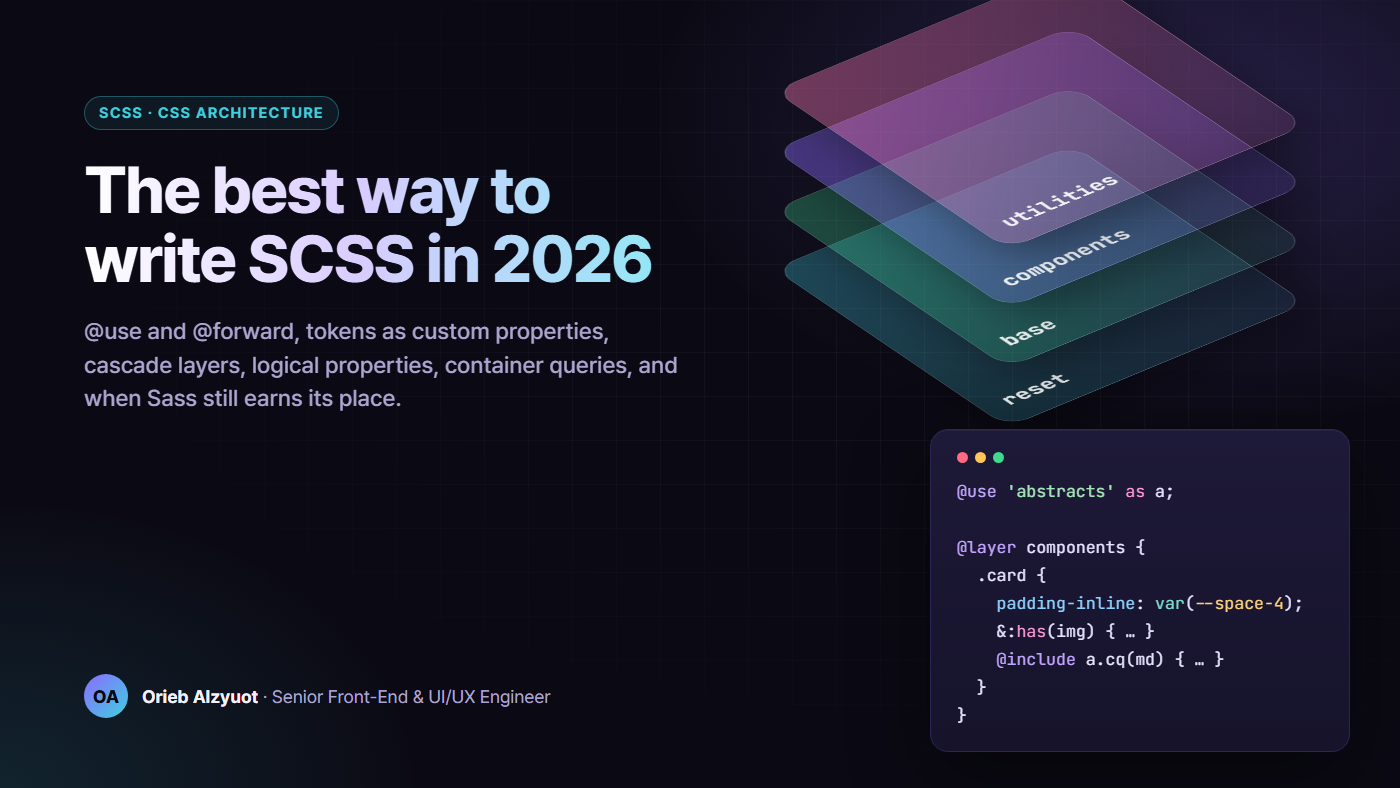
Five years ago, Sass gave us things CSS simply didn’t have: variables, nesting, functions, modules. In 2026 the browser has most of them natively. There’s nesting, custom properties, cascade layers, container queries, :has(), color-mix() and relative colours, and logical properties.
So the question isn’t “Sass or CSS?” It’s which job belongs to which tool. I’ve maintained large Angular and React design systems in SCSS, with multiple themes, contrast modes and full Arabic RTL. The split below is the one that has held up.
TL;DR
- Sass is your build-time layer: maps, loops, mixins, functions and modules. CSS is your runtime layer: anything a theme, a user or a container can change.
@useand@forwardonly.@importis deprecated and on its way out of Dart Sass, and the global functions (darken(),map-get()) went with it.- Tokens live in Sass maps but ship as custom properties. Components read
var(--space-4), never$space-4. - Cascade layers replace specificity wars. Declare the order once and stop reaching for
!important. - Logical properties everywhere. RTL support stops being a separate project.
- Container queries and
:has()remove most breakpoint mixins and most JavaScript-driven class toggles. - Lint the rules you care about. A convention nobody enforces is only a suggestion.
1. The split: build time vs runtime
Most SCSS codebases I inherit have one problem in common: they use Sass variables for values that need to change at runtime. Then dark mode arrives, and someone duplicates 400 lines under .dark-theme.
The rule I use is simple:
- Can it change after the CSS has loaded? It might change because of a theme, a user preference, a container’s size or a component’s state. Then it’s a custom property.
- Is it a constant the build needs? Examples are a breakpoint inside
@media, a loop count, or a map you generate utilities from. Then it’s a Sass variable or map.
Custom properties can’t be used inside media query conditions, so breakpoints stay in Sass. Everything else that looks like a design token goes out as a custom property.
2. The module system: @use and @forward, never @import
Dart Sass deprecated @import in version 1.80, and it’s scheduled to be removed in Dart Sass 3.0. The global built-in functions were deprecated at the same time. map-get(), darken() and percentage() now live in modules: sass:map, sass:color and sass:math.
This isn’t just housekeeping. @import dumped everything into one global namespace and re-emitted CSS each time a file was imported. @use gives you:
- Namespaces:
a.rem(16px)tells you whereremcame from. - Load once: a module’s CSS is emitted once, however many files use it.
- Private members: anything starting with
-or_stays inside its file. - Configuration:
@use 'tokens' with ($base-size: 15px)overrides!defaultvalues.
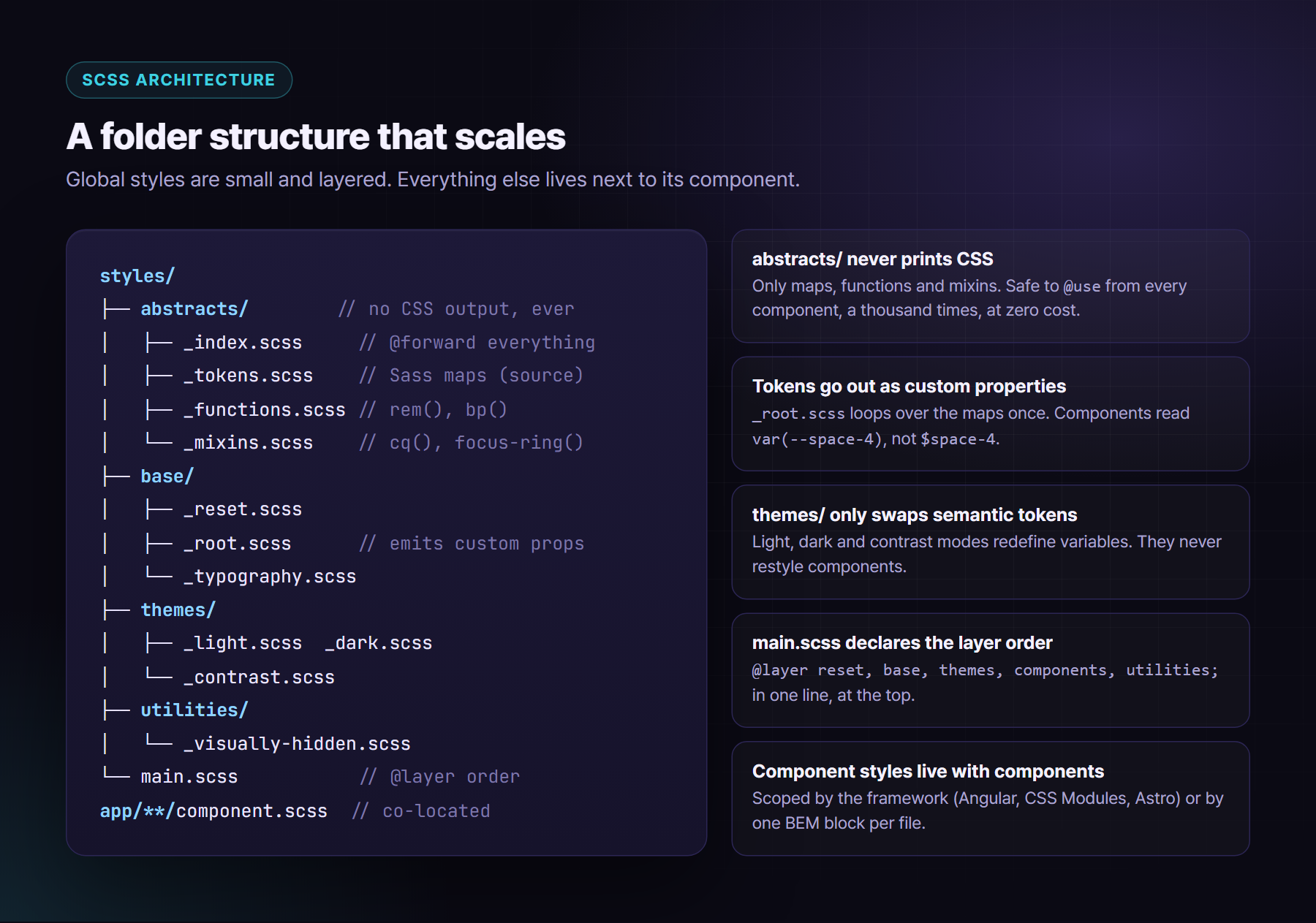
My abstracts/ folder never prints CSS. It only forwards tools:
// styles/abstracts/_index.scss
@forward 'tokens';
@forward 'functions';
@forward 'mixins';
// styles/abstracts/_functions.scss
@use 'sass:math';

$-root-size: 16px; // private: not visible outside this file

@function rem($px) {
  @return math.div($px, $-root-size) * 1rem;
}
// app/features/billing/invoice-card.component.scss
@use '../../../styles/abstracts' as a;

.invoice {
  padding: a.rem(20px);

  @include a.focus-ring;
}
Migrating? Don’t do it by hand. The official migrator handles most of it:
npx sass-migrator module --migrate-deps src/styles/main.scss
Run it on a branch, review the diff and fix the few places where two files relied on sharing a global variable. That shared global was a bug waiting to happen anyway.
3. Tokens: Sass maps at build time, custom properties at runtime
Keep the source of truth in Sass maps. They’re easy to loop over, validate and document. Then emit them once as custom properties:
// styles/abstracts/_tokens.scss
$space: (1: 0.25rem, 2: 0.5rem, 3: 0.75rem, 4: 1rem, 6: 1.5rem);
$radius: (sm: 6px, md: 10px, lg: 16px);
// styles/base/_root.scss
@use '../abstracts' as a;

:root {
  @each $key, $value in a.$space {
    --space-#{$key}: #{$value};
  }
  @each $key, $value in a.$radius {
    --radius-#{$key}: #{$value};
  }
}
Components then use var(--space-4). When a “compact density” setting arrives, you change the variables under [data-density="compact"] and touch zero components.
Two habits make this scale:
- Name tokens by role, not by value. Use
--color-accent, not--purple. The theming article in this series covers the primitive → semantic → component tiers in depth. - Never hard-code a hex in a component file. Lint for it (section 10).
4. Cascade layers: order beats specificity
@layer is the single biggest quality-of-life change in CSS architecture. You declare the order once, and a later layer wins over an earlier one whatever the selector specificity.
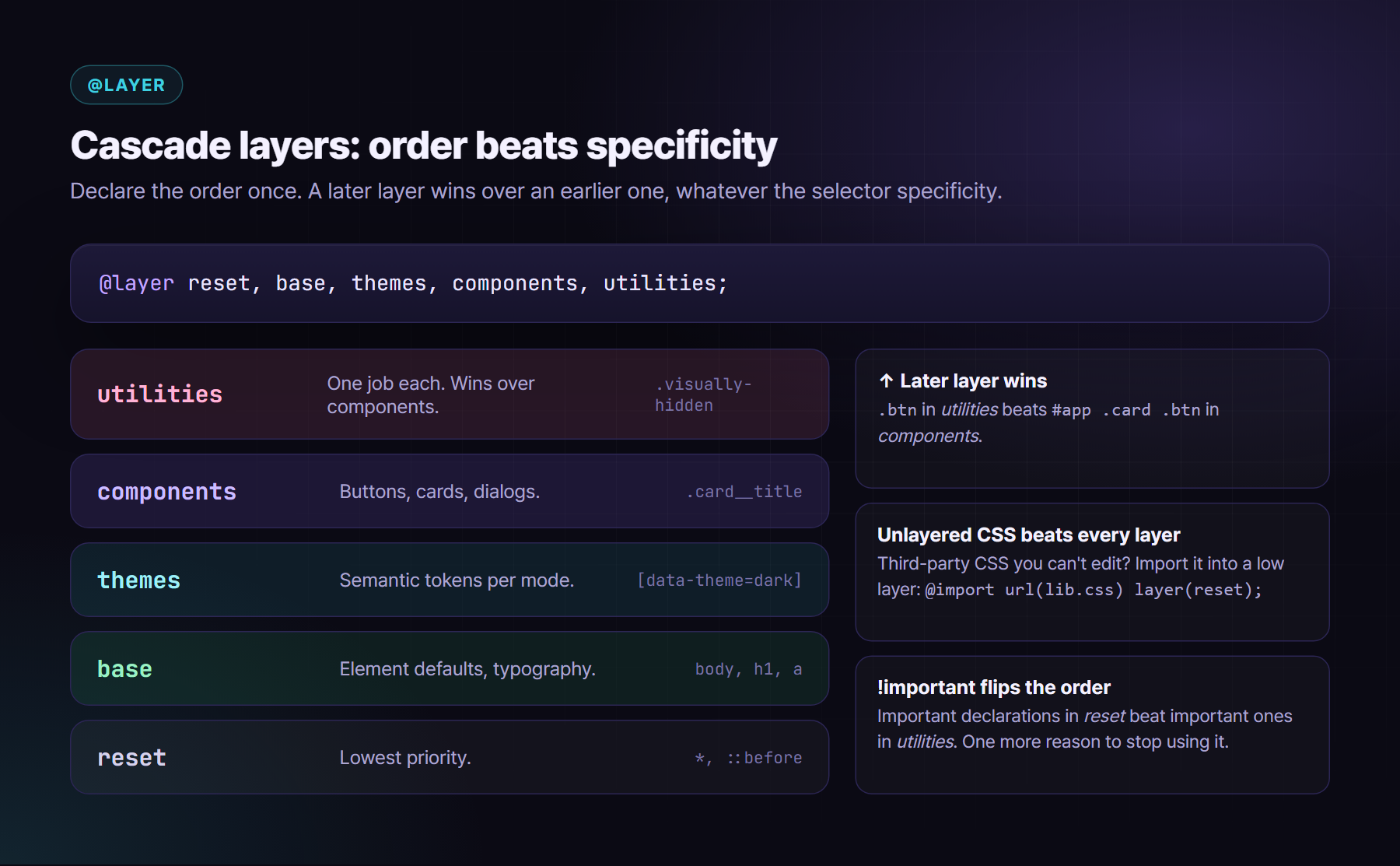
In Sass, @use must sit at the top of a file, so you can’t put it inside @layer. Use meta.load-css() instead, which can be included inside a layer block:
// styles/main.scss
@use 'sass:meta';

@layer reset, base, themes, components, utilities;

@layer reset      { @include meta.load-css('base/reset'); }
@layer base       { @include meta.load-css('base/root'); @include meta.load-css('base/typography'); }
@layer themes     { @include meta.load-css('themes/light'); @include meta.load-css('themes/dark'); }
@layer utilities  { @include meta.load-css('utilities/visually-hidden'); }
Component styles wrap themselves:
@layer components {
  .card {
    padding: var(--space-4);
    border-radius: var(--radius-lg);
  }
}
Three things people get wrong:
- Unlayered styles beat all layered styles. A stray global stylesheet that isn’t in a layer will override everything. Put third-party CSS into a low layer:
@import url('vendor.css') layer(reset);(that’s a plain CSS import, which Sass leaves alone). !importantflips the order. An important declaration inresetbeats an important one inutilities. That’s by design, so that a reset can protect something. It’s one more reason to stop using!importantfor everyday overrides.- Layer order is set by the first time a name appears. Put the
@layer a, b, c;statement first, in the first stylesheet that loads.
5. Logical properties: RTL support for free
If you ship Arabic, Hebrew, Persian or Urdu, physical properties such as margin-left are bugs you haven’t found yet. Logical properties follow the writing direction:
.toast {
  inset-inline-end: var(--space-4);   // right in LTR, left in RTL
  padding-block: var(--space-2);
  padding-inline: var(--space-4);
  border-inline-start: 4px solid var(--color-accent);
  border-start-end-radius: var(--radius-md);
  text-align: start;
}
Some things logical properties can’t flip, such as transforms and directional icons. Use the :dir() pseudo-class, which is now supported across modern engines, rather than reading [dir] attributes up the tree:
.chevron:dir(rtl) {
  scale: -1 1;
}
The rule in my teams is simple: physical properties need a comment explaining why. Stylelint enforces it (section 10).
6. Modern CSS that replaces old Sass habits
color-mix() and relative colours instead of darken()
darken() and lighten() ran at build time, in HSL, on one fixed colour. They can’t follow a runtime theme, and HSL lightness isn’t perceptual, so the results look muddy. Do it in the browser, in OKLCH:
.btn {
  background: var(--color-accent);

  &:hover {
    // mix 12% black in, perceptually
    background: color-mix(in oklch, var(--color-accent), black 12%);
  }
}

.badge {
  // same hue, lower lightness, from whatever the theme says the accent is
  color: oklch(from var(--color-accent) calc(l - 0.08) c h);
  background: color-mix(in oklch, var(--color-accent) 14%, transparent);
}
Sass passes these through untouched. They react to the active theme and need no extra CSS.
Container queries instead of breakpoint mixins
A product card doesn’t care how wide the viewport is. It cares how wide its slot is. In a sidebar on a 1440px screen it’s narrow; full-width on a tablet it’s wide.
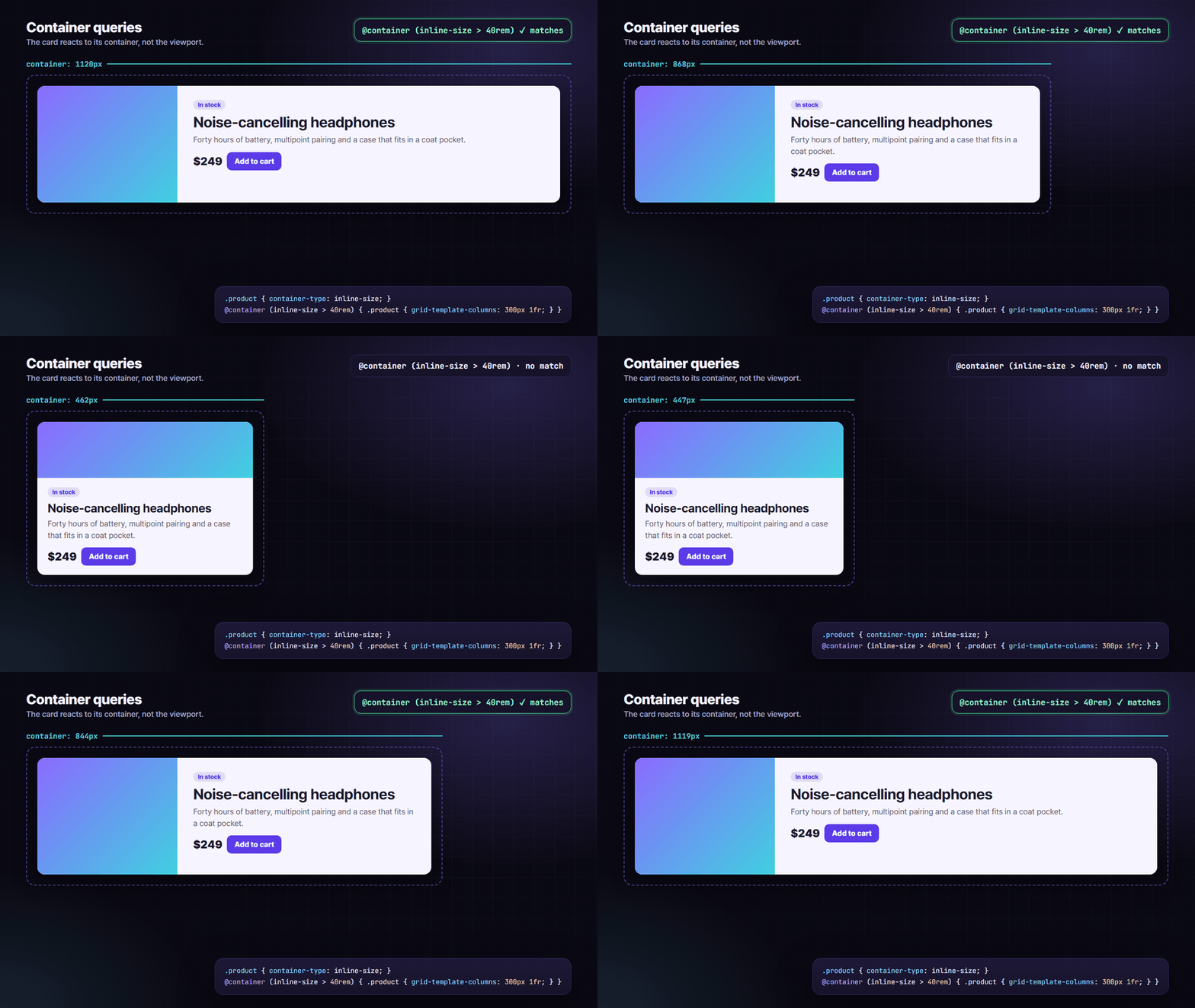
I keep one tiny mixin so container sizes have names, like breakpoints did:
// styles/abstracts/_mixins.scss
@use 'sass:map';

$cq: (sm: 30rem, md: 40rem);

@mixin cq($name) {
  @container (inline-size > #{map.get($cq, $name)}) {
    @content;
  }
}
@use '../abstracts' as a;

.product { container-type: inline-size; }

.product__body {
  display: grid;
  gap: var(--space-3);

  @include a.cq(md) {
    grid-template-columns: 12rem 1fr;
  }
}
Keep viewport media queries for page-level layout: the shell, navigation and the main grid. Use container queries for anything that might be reused somewhere else.
:has() instead of JavaScript class toggles
The parent selector removes a whole category of [class.has-error] bindings:
.field:has(:user-invalid) {
  --field-border: var(--color-danger);
}

.card:has(> img:first-child) {
  padding-block-start: 0;
}

// lock scroll while any modal dialog is open
html:has(dialog[open]:modal) {
  overflow: hidden;
}
Native nesting vs Sass nesting
Native CSS nesting is supported in every modern engine, so for a plain .card { &:hover {} } you don’t need Sass. There are three differences you should know about:
- No suffix concatenation.
&__titleand&--featuredare Sass-only. Native nesting can’t glue strings onto a selector. - Specificity. Native nesting behaves like
:is(), so a nested selector list takes the specificity of its most specific member. Sass writes the selectors out in full. - Declarations after nested rules. Current Dart Sass emits declarations that come after a nested rule in their own block. This keeps their order, matching how native CSS nesting works. Write declarations first anyway, because it’s easier to read.
My rule: nest one level for states (&:hover, &:focus-visible, &[aria-expanded="true"]) and BEM elements. If you’re three levels deep, you’re mirroring the DOM, and that markup will change.
7. Live demo: SCSS in, CSS out
Here are four small examples, compiled with real Dart Sass. You can see exactly what the browser receives and which parts Sass is still doing.
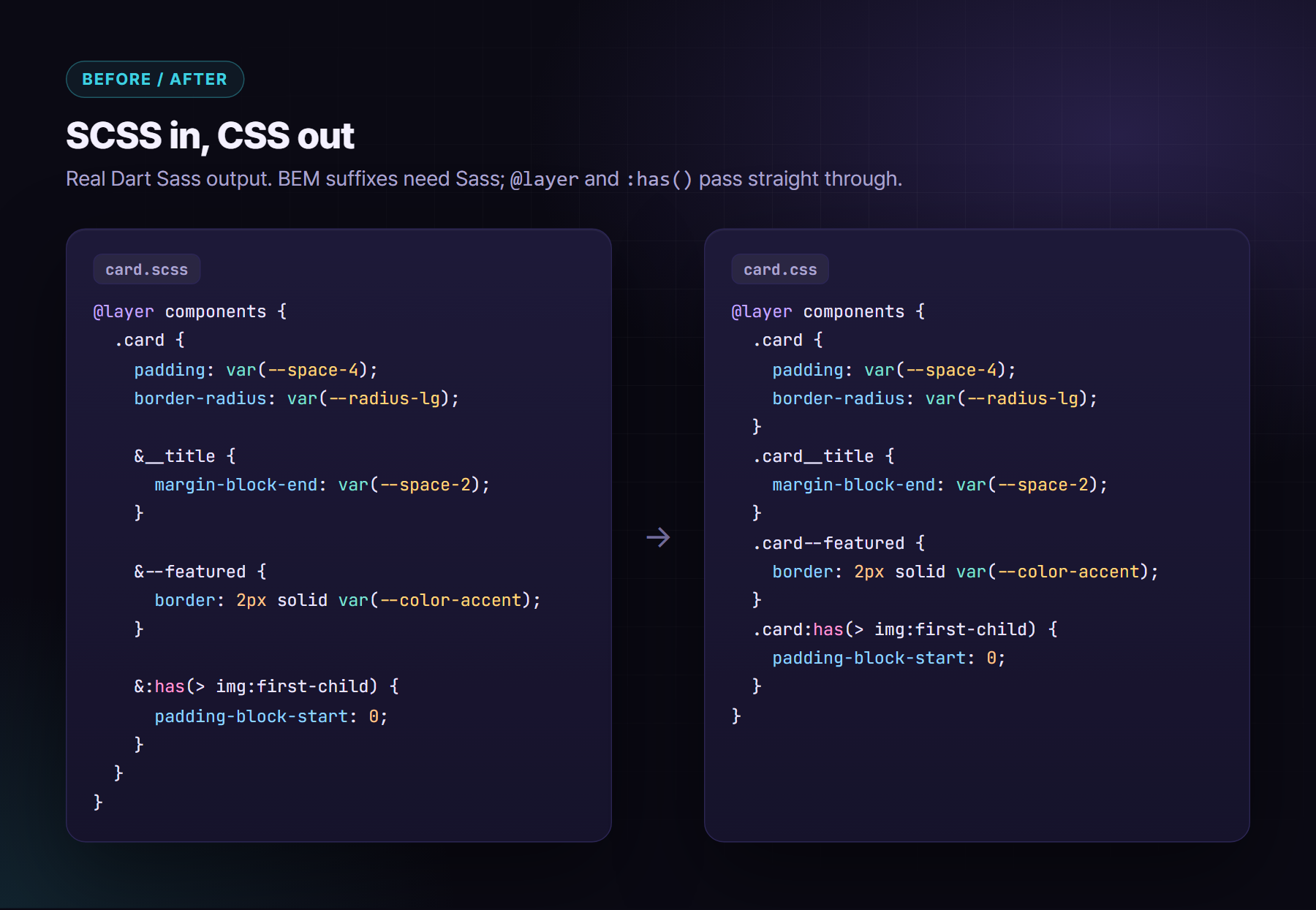
▶ Try it live: https://oriebalzyuot96.github.io/blog/scss-in-2026/#demo-scss
8. When Sass still earns its place
I still choose SCSS for design systems, for these reasons:
- Loops and maps. You can generate custom properties, spacing utilities or a colour scale from one source map, and validate it at build time with
@error. - Mixins with parameters and logic. Examples are
focus-ring($offset),visually-hidden(),cq($name),truncate($lines)andreduced-motion { … }. CSS has no equivalent yet. - Modules. Namespaces, private members and configurable libraries (
@use 'ds' with (...)) are real architecture tools. - Build-time math and guards.
math.div, unit conversion, and@ifchecks that fail the build when someone passes a value in the wrong unit. - Media query constants. Custom properties can’t go inside
@media, but Sass variables can.
What it should not do any more: theme colours, runtime spacing, darken(), @extend across files, or deep nesting.
Here’s the focus ring mixin I’ve used for years. It’s tiny and opinionated, and it appears everywhere:
@mixin focus-ring($offset: 2px) {
  &:focus-visible {
    outline: 2px solid var(--color-focus);
    outline-offset: $offset;
  }
}

.btn {
  padding-block: var(--space-2);
  padding-inline: var(--space-4);

  @include focus-ring;

  @media (prefers-reduced-motion: no-preference) {
    transition: background-color 150ms ease;
  }
}
9. BEM vs component scoping, and a folder structure
BEM or scoped styles? It depends on who scopes:
- If your framework scopes styles, through Angular’s emulated encapsulation, CSS Modules, Vue
scopedor Astro, keep class names short and meaningful inside the component..titleinsideinvoice-cardis fine. Writing BEM inside an already-scoped file is ceremony. - For global and shared CSS, use BEM: anything in
styles/, a design-system package, or markup consumed by other apps. It’s the only scoping you have there. @scopeis the native answer to “styles for this block, but not its nested children”. Support has been arriving across engines. Check your browser matrix before you rely on it, and treat it as progressive enhancement for now.
The structure I keep coming back to is small and global, with everything else co-located:
10. Lint it, or it didn’t happen
Conventions decay. Stylelint makes them mechanical. Here’s a starting config:
{
  "extends": ["stylelint-config-standard-scss"],
  "plugins": ["stylelint-use-logical", "stylelint-declaration-strict-value"],
  "rules": {
    "csstools/use-logical": ["always", { "except": ["float", "width", "height"] }],
    "scale-unlimited/declaration-strict-value": [
      ["/color$/", "fill", "stroke", "z-index"],
      { "ignoreValues": ["currentColor", "transparent", "inherit", "initial", "unset", "none"] }
    ],
    "scss/no-global-function-names": true,
    "max-nesting-depth": [2, { "ignore": ["pseudo-classes"] }],
    "selector-max-id": 0,
    "selector-max-compound-selectors": 3,
    "declaration-no-important": true,
    "color-no-hex": true
  }
}
use-logicalturns RTL bugs into lint errors.declaration-strict-valueforces colours to come fromvar(--…).no-global-function-namescatchesdarken()andmap-get()before Dart Sass removes them.- Allow exceptions with a disable comment and a reason. Reviewers read the reason.
Run it in CI, with the --max-warnings 0 flag. That’s how a lint rule becomes a build failure.
11. What to stop doing
- ❌
@importand global functions such asdarken(),lighten()andmap-get(). - ❌ Sass variables for anything a theme or user can change.
- ❌
margin-left,padding-right,left: 0,text-align: leftin new code. - ❌ Nesting deeper than two levels to mirror the DOM.
- ❌
@extendacross files. It creates selector soup and surprising source order. - ❌
!importantto win a specificity fight. Put the rule in the right layer. - ❌ Viewport breakpoints for components that could live anywhere.
- ❌ Hand-written vendor prefixes. Autoprefixer or Lightning CSS does this from your browserslist.
- ❌ Magic
z-index: 9999. Use a small named scale in tokens. - ❌
outline: nonewithout a visible replacement.
What I’d do on a new project
- ✅ Dart Sass with
@use/@forwardonly, and the module migrator run on legacy code. - ✅ Token maps in
abstracts/, emitted once as custom properties inbase/_root.scss. - ✅
@layer reset, base, themes, components, utilities;as the first line of CSS. - ✅ Logical properties enforced by Stylelint, with
:dir(rtl)for the rest. - ✅
color-mix()and relative OKLCH colours for hover, tint and border variants. - ✅ Container queries for components, with a named
cq()mixin. - ✅
:has()instead of JavaScript-driven parent classes. - ✅ Component styles co-located and scoped, with BEM only for global and shared CSS.
- ✅ Stylelint in CI with zero warnings allowed.
Sass isn’t dead. It has stopped pretending to be a runtime. Let CSS own what changes and let Sass own what you generate, and your stylesheets get smaller, themeable and much easier to review.
About the author
Orieb Alzyuot (عريب الزيوت) is a Senior Front-End & UI/UX Engineer based in Amman, Jordan, with 6+ years of experience building government, fintech, HR and enterprise products used every day. Her work includes:
- Angular from AngularJS to v22 with Signals;
- React and React Native apps that share business logic with the web;
- custom design systems with multiple themes and accessibility modes;
- native-feeling Arabic RTL;
- AI-assisted engineering with Cursor and Claude Code.
Open to senior and lead front-end roles, contracts and freelance work, remote or with relocation.
Find me here:
- 🌐 Portfolio: https://oriebalzyuot96.github.io
- 📄 CV (PDF): https://oriebalzyuot96.github.io/Orieb-Alzyuot-CV.pdf
- 💼 LinkedIn: https://www.linkedin.com/in/orieb-alzyuot996
- 🐙 GitHub: https://github.com/oriebalzyuot96
- 💡 Stack Overflow: https://stackoverflow.com/users/13313528/orieb-alzyuot
- ⚡ StackBlitz: https://stackblitz.com/@oriebalzyuot96
- 🖊️ CodePen: https://codepen.io/oriebalzyuot96
- ✉️ Email: alzuotorieb9999@gmail.com
If this helped, follow me on Medium for more on design systems, accessibility, Angular, React and front-end architecture. 💜