Theming Done Right: Light, Dark, Brand Palettes and User Preferences
Dark mode is a weekend task. Theming that survives brand palettes, contrast modes, user preferences, Arabic RTL and a design team that keeps adding colours takes architecture. Here is the one I use.
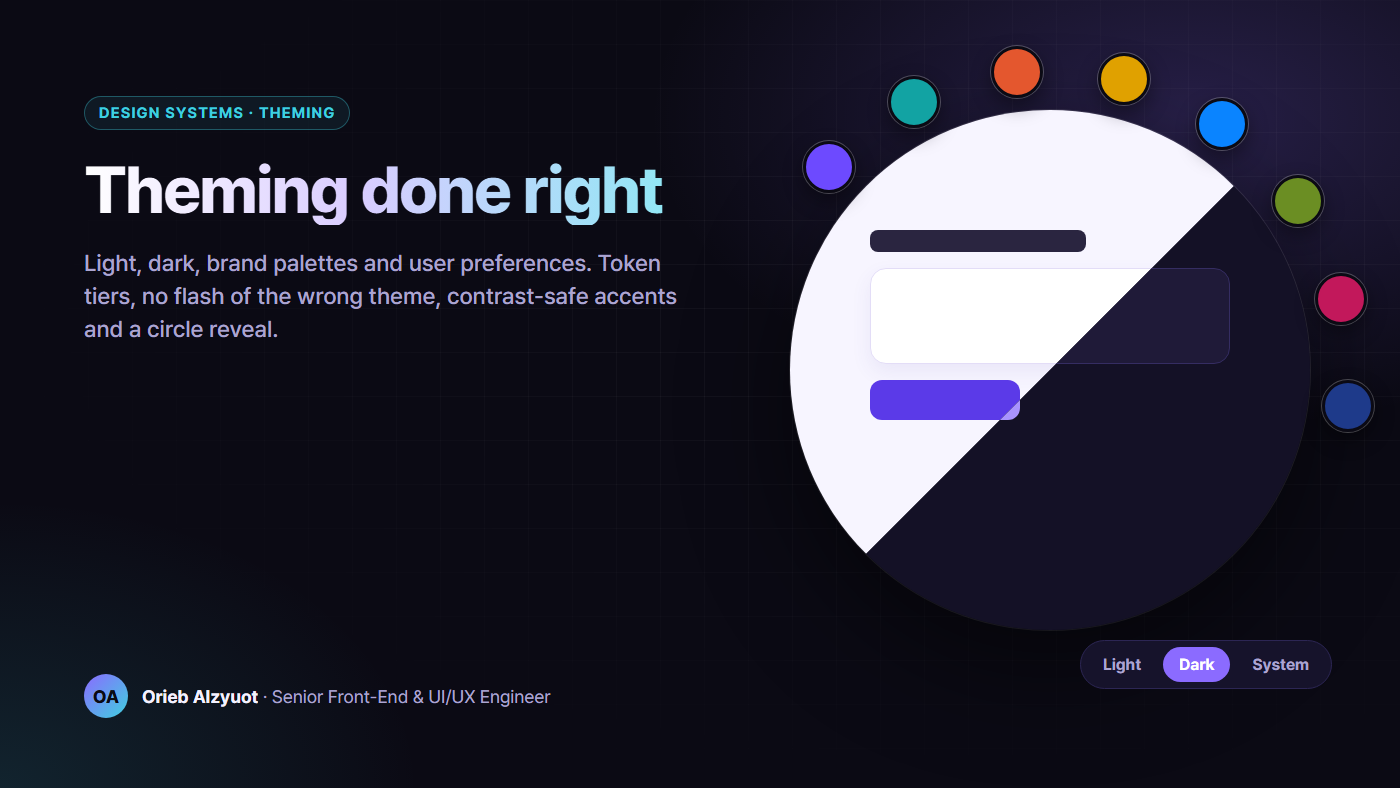
I’ve built theming for products that ship ten brand palettes, light and dark modes, three contrast modes and full Arabic RTL, on both web and mobile from the same tokens. Every hard bug came from one of four places: tokens named by value, themes that restyle components, a flash of the wrong theme on load, and accent colours nobody checked for contrast.
This article walks through each one, with the code I’d ship.
TL;DR
- Three tiers of tokens: primitive → semantic → component. Themes only remap the semantic tier.
- One attribute per axis on
<html>:data-theme,data-accent,data-contrast. Write down which one wins. - Three-state mode: system, light, dark. “System” follows
prefers-color-schemelive. - No flash: a tiny inline script in
<head>sets the attributes before the first paint. - One seed colour → a full palette, with every pair checked against WCAG 2.2 contrast at generation time.
- Persist the choice, not just the colours: in localStorage for guests and in the user’s profile once they sign in.
- Animate with the View Transitions API, and skip the animation when the user prefers reduced motion.
1. Three tiers of tokens
The most expensive theming mistake is a component that says color: $purple-600. When the brand changes, or dark mode arrives, you have to find every one.
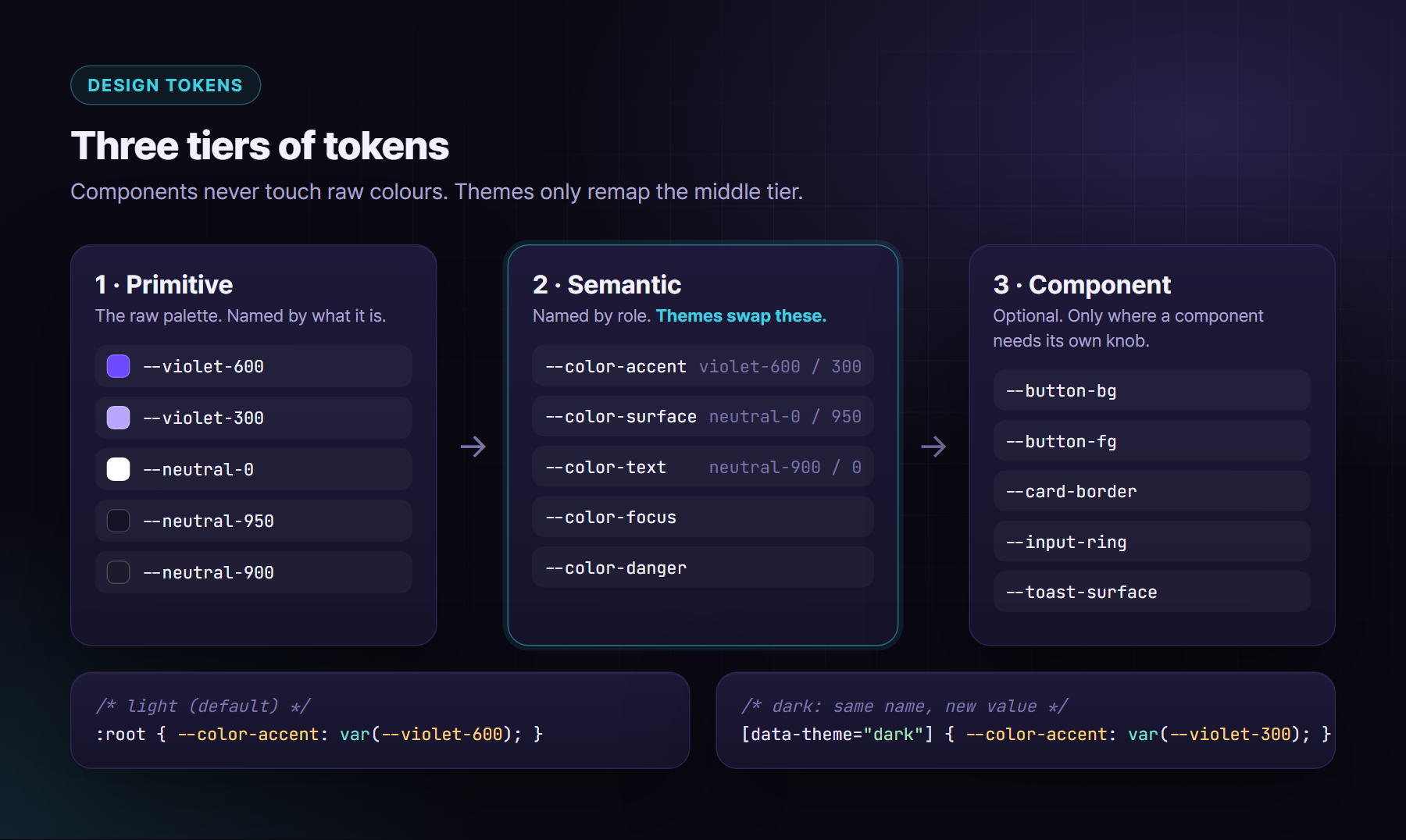
/* 1 · Primitive: the raw palette, named by what it is */
:root {
  --violet-300: #b9a7ff;
  --violet-600: #6d4aff;
  --neutral-0: #ffffff;
  --neutral-900: #1d1a2b;
  --neutral-950: #151126;
}

/* 2 · Semantic: named by role. Themes remap ONLY these. */
:root,
[data-theme="light"] {
  color-scheme: light;
  --color-bg: var(--neutral-0);
  --color-surface: var(--neutral-0);
  --color-text: var(--neutral-900);
  --color-accent: var(--violet-600);
  --color-on-accent: var(--neutral-0);
  --color-focus: var(--violet-600);
}

[data-theme="dark"] {
  color-scheme: dark;
  --color-bg: var(--neutral-950);
  --color-surface: #211d31;
  --color-text: #eeebf7;
  --color-accent: var(--violet-300);
  --color-on-accent: var(--neutral-950);
  --color-focus: var(--violet-300);
}

/* 3 · Component: optional knobs, defaulting to semantic tokens */
.button {
  --button-bg: var(--color-accent);
  --button-fg: var(--color-on-accent);
  background: var(--button-bg);
  color: var(--button-fg);
}
Some rules that keep this healthy:
- Components never read primitives. Lint for it.
- Semantic names describe a job, such as
surface,text-muted,accent,dangerorfocus. If you can’t name the job, you probably don’t need the token. - Component tokens are optional. Add one only when a component really needs its own knob, for example a button whose background differs from the accent in one brand.
- Set
color-schemeper theme. It switches native scrollbars, form controls and the default canvas to match.
2. One attribute per axis, and a written precedence
Real products don’t have one theme switch. They have several independent axes:
- Mode: light or dark →
data-theme - Brand palette or accent: →
data-accent(or a fulldata-palette) - Contrast mode: none, high, grayscale or invert →
data-contrast - Density, font scale, readable font: their own attributes or custom properties
Put each one on <html> as its own attribute. Never combine them into a class like .dark-teal-compact. And write down the precedence, because two axes will eventually fight. Mine is:
- A contrast mode wins over everything. When it’s on, every brand variable is removed and the contrast stylesheet owns the palette. The user’s brand choice is kept and comes back when contrast mode is switched off.
- The brand palette sets surfaces, text, lines and the accent family.
- An accent override regenerates only the accent family, on top of the palette’s surfaces.
- Mode (light or dark) selects which half of each palette applies.
You might ask whether light-dark() is enough on its own. It’s a great fit when you have exactly two modes and only colours change: color: light-dark(#1d1a2b, #eeebf7) follows color-scheme. Once you have brand palettes, contrast modes or non-colour tokens, attribute-scoped variables stay clearer.
3. System preference plus a user override
Give users three choices, not two: System, Light and Dark. “System” must follow the OS live, including automatic sunset switching, without a reload.
type Mode = 'system' | 'light' | 'dark';
const KEY = 'ui-theme';
const mq = matchMedia('(prefers-color-scheme: dark)');

export function resolvedMode(mode: Mode): 'light' | 'dark' {
  return mode === 'system' ? (mq.matches ? 'dark' : 'light') : mode;
}

export function applyMode(mode: Mode) {
  document.documentElement.dataset.theme = resolvedMode(mode);
  try {
    if (mode === 'system') localStorage.removeItem(KEY);
    else localStorage.setItem(KEY, mode);
  } catch { /* private mode or storage blocked: still works for this visit */ }
}

// Follow the OS while the user is on "system"
mq.addEventListener('change', () => {
  if (!localStorage.getItem(KEY)) applyMode('system');
});
Store system as “no value”. If you store the resolved value, users who chose “System” get stuck on whatever the OS said on that first day.
4. No flash of the wrong theme
If your framework applies the theme after it boots, users on dark mode see a white flash on every hard reload. The fix is old and boring, and it still works: a tiny, synchronous inline script in <head>, before any stylesheet that paints.
<head>
  <meta name="color-scheme" content="light dark">
  <script>
    (function () {
      var d = document.documentElement;
      try {
        var mode = localStorage.getItem('ui-theme');
        if (mode !== 'light' && mode !== 'dark') {
          mode = matchMedia('(prefers-color-scheme: dark)').matches ? 'dark' : 'light';
        }
        d.dataset.theme = mode;
        var accent = localStorage.getItem('ui-accent');
        if (accent) d.dataset.accent = accent;
        var contrast = localStorage.getItem('ui-contrast');
        if (contrast) d.dataset.contrast = contrast;
      } catch (e) {
        d.dataset.theme = 'light';
      }
    })();
  </script>
  <link rel="stylesheet" href="/styles.css">
</head>
Some details that matter:
- Keep it tiny and dependency-free. It blocks parsing, so a few hundred bytes is the budget.
- Mirror the app’s logic exactly, including defaults, keys and precedence. I put a comment in both places: “keep in sync with boot script”.
- Generated palettes: if the brand colours are computed in JavaScript, cache the final variables for both modes (for example
{ v: 2, light: {...}, dark: {...} }) and have the boot script applyvars[mode]. Version the cache so old formats are ignored, not misread. - CSP: inline scripts need a nonce or a hash. Add
'sha256-…'of this exact script toscript-srcand don’t loosen the policy with'unsafe-inline'. - Server rendering? Put the mode in a cookie and render
data-themeon the server. Then you need no script at all, except to resolve “system”.
5. Deriving a palette from one seed colour
Brand teams give you one colour. You need a page background, card surfaces, lines, text, muted text, the accent, text on the accent, hover states and tints, all for both light and dark, and all accessible.
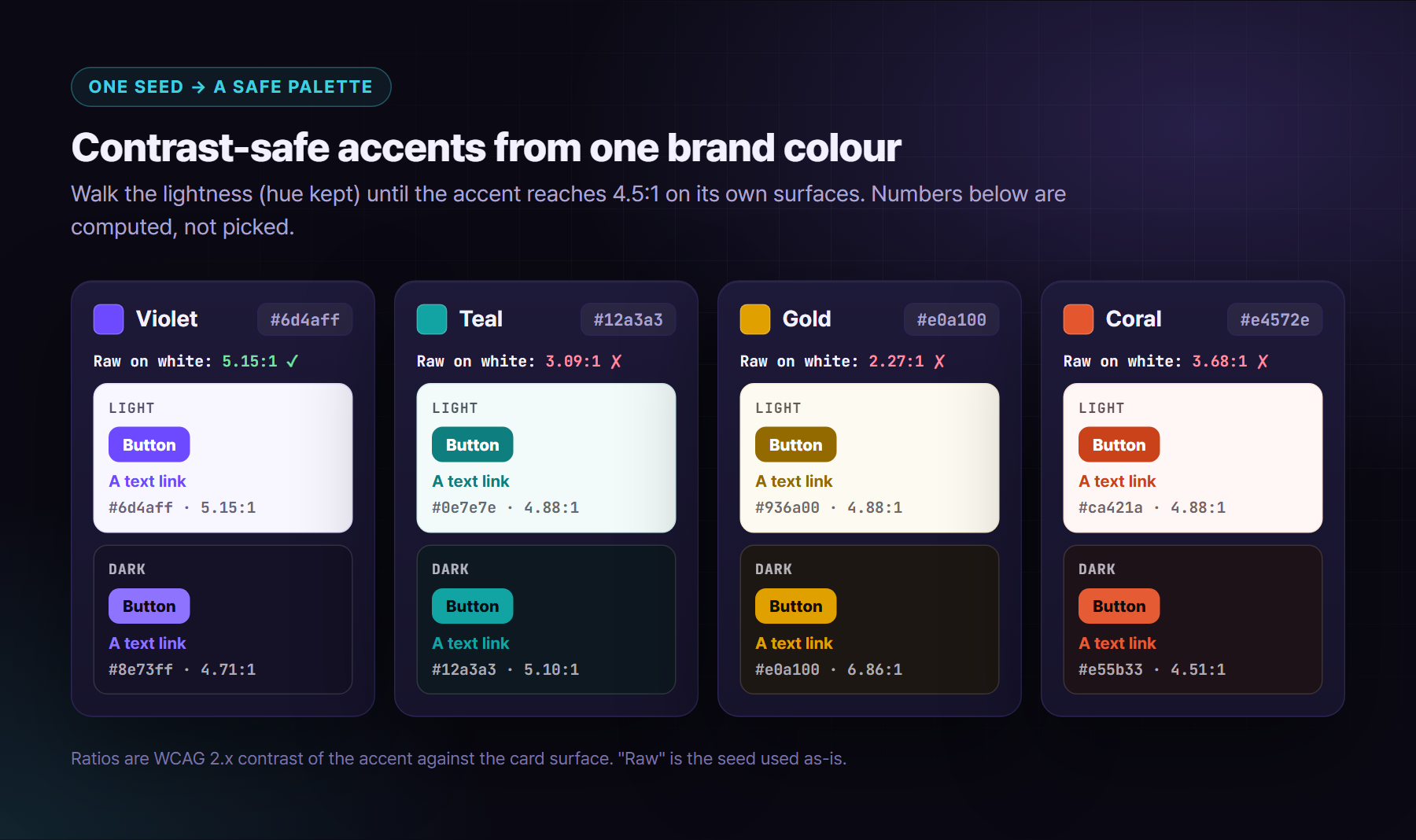
My generator takes a seed and moves it until the contrast targets pass. It changes the lightness in small steps, keeping hue and saturation, so the brand still reads as the brand:
/** Walk lightness 1% at a time (hue and saturation kept) until every check passes. */
function shiftToContrast(hex: string, ok: (c: string) => boolean, dir: -1 | 1): string {
  const [h, s, l] = toHsl(hex);
  for (let i = 0; i <= 100; i++) {
    const c = fromHsl([h, s, clamp01(l + dir * i / 100)]);
    if (ok(c)) return c;
  }
  return dir < 0 ? '#000000' : '#ffffff';
}

export function derivePalette(seed: string, mode: 'light' | 'dark') {
  const dark = mode === 'dark';
  const page = dark ? mix('#0e0d16', seed, 0.07) : mix('#ffffff', seed, 0.05);
  const card = dark ? mix(page, '#ffffff', 0.05) : '#ffffff';
  const accent = dark
    ? shiftToContrast(seed, c => contrast(c, card) >= 4.5 && contrast(c, page) >= 4.5, +1)
    : shiftToContrast(seed, c => contrast(c, card) >= 4.5 && contrast('#ffffff', c) >= 4.5, -1);
  return { page, card, accent, onAccent: dark ? mix(page, '#000000', 0.45) : '#ffffff' };
}
contrast() is the standard WCAG 2.x relative-luminance ratio. Here is what it does to four real seeds:
The targets I enforce at generation time:
- Body text ≥ 4.5:1 on every surface it can sit on. That’s WCAG 2.2 SC 1.4.3 (AA). I aim for 7:1, because it’s cheap when you generate the palette.
- Accent used as text or links ≥ 4.5:1 on surfaces and on the accent’s own tinted backgrounds, such as selected rows and badges.
- Text on the accent fill ≥ 4.5:1, so buttons stay readable.
- Non-text UI ≥ 3:1: focus rings, input borders and icons that carry meaning. That’s SC 1.4.11.
- Hover states keep every ratio above. Generate them, then check them again.
A note on APCA: it’s a promising perceptual contrast model, but WCAG 3 is still a draft and isn’t normative. Use WCAG 2.2 ratios for compliance, and consider APCA as an extra design signal if your team wants one.
6. Contrast-safe accents in the UI
A colour picker for “your brand colour” is a contrast bug generator, unless the UI shows the result and fixes it:
- Show the computed ratio next to the picker, with pass or fail.
- Offer an “Auto-adjust for accessibility” switch, on by default. It’s the same
shiftToContrastas above. - When adjusted, say so: “Your colour #e0a100 is shown as #936a00 in light mode for readability.”
- In a contrast mode, ignore brand colours completely (precedence rule 1).
7. Persisting the choice
Store the user’s decision, not just the output:
- Guests:
localStoragekeys for mode, accent and contrast. Wrap every call intry/catch, because storage can be blocked or full. - Signed-in users: save the same fields to their profile, so the theme follows them to another device or to the mobile app. After sign-in, the server value wins, unless the local choice is newer (keep an
updatedAt). - Cache derived variables separately, versioned, so the boot script can paint them before your app boots. Rebuild the cache whenever the generator changes.
- “Reset to default” clears everything, including the cache.
Also: encrypting these localStorage values doesn’t make them secret, because the key ships in your bundle. It only stops casual tampering. It’s fine for preferences, but keep it in mind for anything sensitive. The security article in this series has more on that.
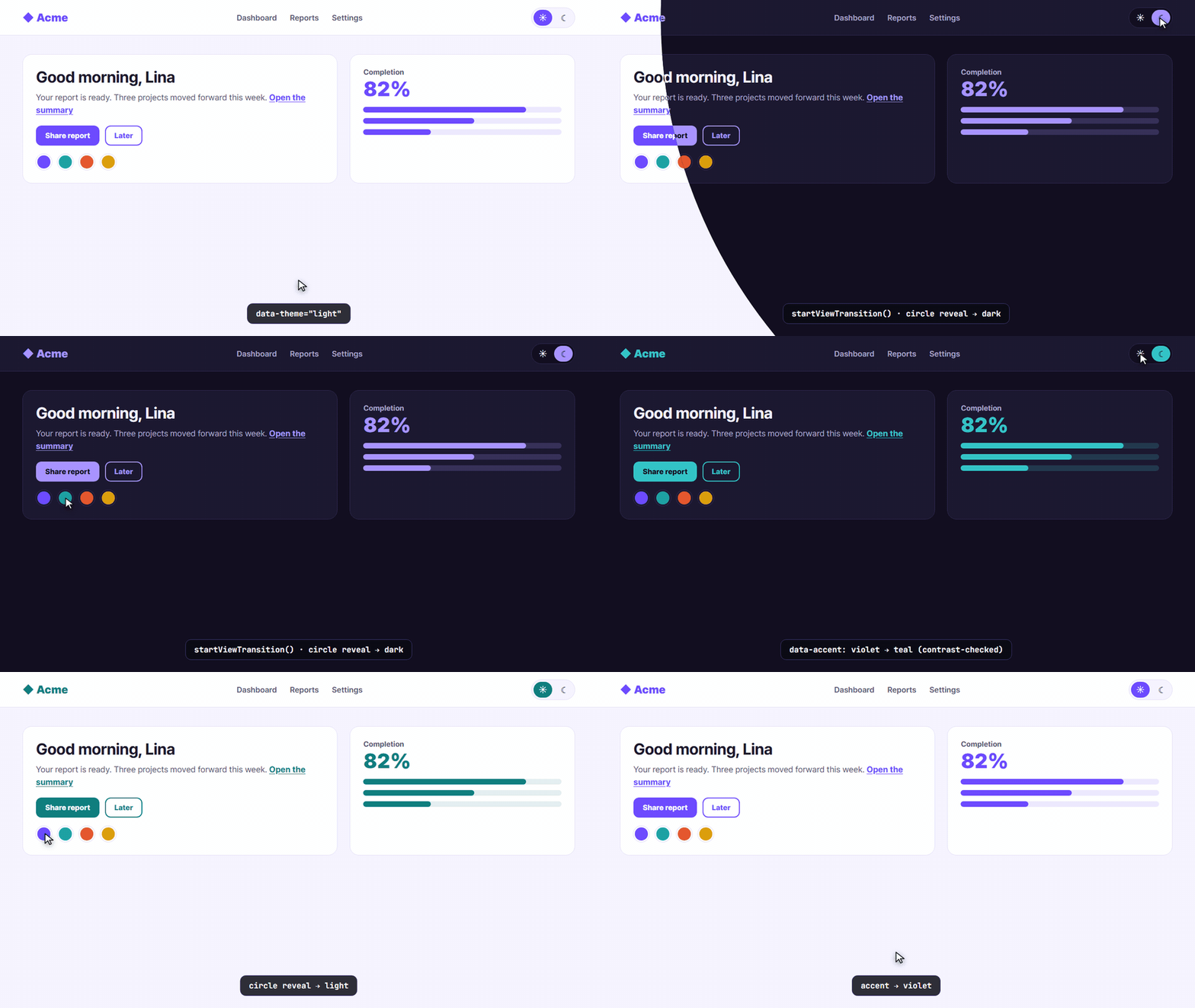
8. Animating the switch: a View Transitions circle reveal
A theme switch is a whole-page change, which is exactly what the View Transitions API is for. The browser snapshots the old page, you apply the new theme, and then you animate between the two snapshots.
export function switchTheme(apply: () => void, origin?: { x: number; y: number }) {
  const reduce = matchMedia('(prefers-reduced-motion: reduce)').matches;
  if (!document.startViewTransition || reduce) {
    apply();
    return;
  }

  // From the pointer if there was one, else from the top centre (keyboard users)
  const x = origin?.x ?? innerWidth / 2;
  const y = origin?.y ?? 0;
  const r = Math.hypot(Math.max(x, innerWidth - x), Math.max(y, innerHeight - y));

  const t = document.startViewTransition(apply);
  t.ready.then(() => {
    document.documentElement.animate(
      { clipPath: [`circle(0 at ${x}px ${y}px)`, `circle(${r}px at ${x}px ${y}px)`] },
      { duration: 600, easing: 'cubic-bezier(.65, 0, .2, 1)', pseudoElement: '::view-transition-new(root)' },
    );
  });
}
/* Let our clip-path animation run instead of the default cross-fade */
::view-transition-old(root),
::view-transition-new(root) {
  animation: none;
  mix-blend-mode: normal;
}
What I’ve learned shipping this:
- Record the pointer position on
pointerdown, and clear it onkeydown. Keyboard users get a reveal from a sensible default instead of from wherever the mouse happens to be. - Respect reduced motion through both the media query and your own in-app “reduce motion” setting.
- Don’t add
transition: allon*to “animate the theme”. It makes every hover laggy and costs performance on large pages. The View Transition does the animation once, on snapshots. - Batch updates: if mode and accent change in the same tick, apply both inside the same transition callback.
- Feature-detect. Browsers without the API simply switch instantly.
9. Theming in RTL
Colour tokens don’t care about direction, but a few theme-level things do:
- Directional gradients.
linear-gradient(to right, …)doesn’t flip. Flip the angle with a token:--grad-angle: 90deg, overridden in:dir(rtl)to-90deg. - Directional shadows such as
box-shadow: 8px 0 …need the x-offset flipped the same way. - Fonts are a theme token too. Arabic needs its own family, often a slightly larger size, a taller line-height, and no letter-spacing, because tracking breaks the joined letterforms. Use something like
:lang(ar) { --font-body: …; --tracking: 0; }. - A “readable font” accessibility setting must beat the Arabic font rule. That’s another precedence to write down.
- Brand marks don’t mirror. Arrows do. See the mirroring guide in the accessibility article in this series.
10. Live demo: theme playground
Pick a mode, pick a brand seed, or choose your own, and watch the contrast-safe adjustment work. The mode switch uses the circle reveal above, and your choice is saved in this page’s localStorage.
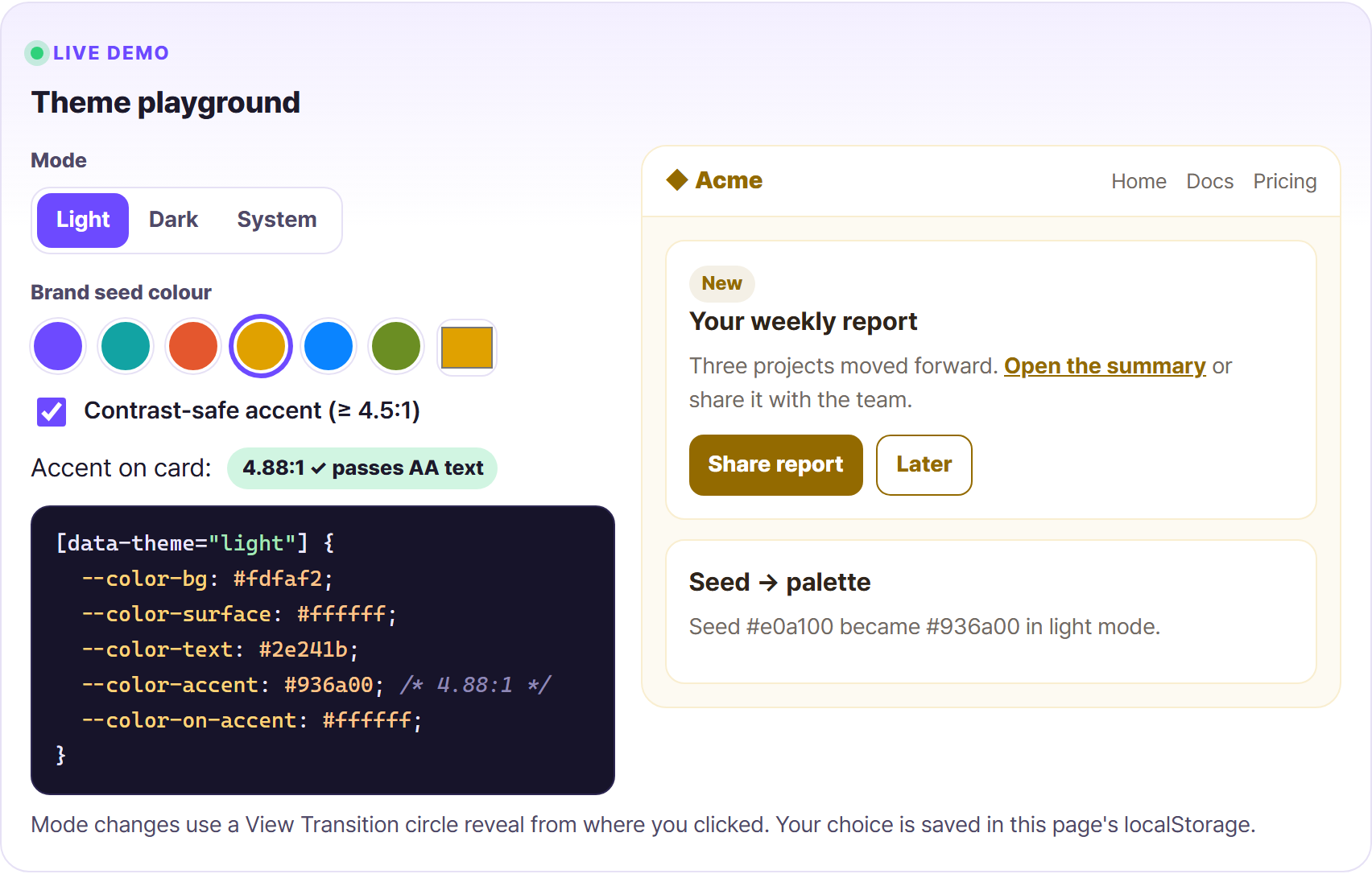
▶ Try it live: https://oriebalzyuot96.github.io/blog/theming-done-right/#demo-theme
11. Testing themes
Themes multiply your test matrix, so automate the boring parts:
- Unit-test the generator. For every brand seed × mode, assert each token pair meets its contrast target. This catches a bad new brand colour before a designer does.
- Visual regression on a few key screens × modes × LTR/RTL. Keep it to a handful of screens. The full matrix explodes quickly.
- Run axe in each theme. Its colour-contrast rule catches real text-on-background combinations the generator never saw, such as text on an image.
- Check Windows forced colours (
@media (forced-colors: active)). Your custom borders and focus rings may disappear. Useoutline(notbox-shadow) for focus, and use system colours such asCanvasTextandHighlightwhere needed. - Hard-reload test: dark mode, cache disabled, slow 3G. If you see a flash, the boot script is wrong.
What I’d do on a new product
- ✅ Primitive → semantic → component tokens, and components never read primitives.
- ✅
data-theme,data-accentanddata-contraston<html>, with a written precedence (contrast wins). - ✅ Three-state mode, where “System” follows
prefers-color-schemelive. - ✅ An inline boot script in
<head>, with a CSP hash, mirroring the app’s logic. - ✅ Palettes generated from one seed, with contrast enforced at generation time and unit-tested.
- ✅ The choice persisted locally and in the user profile, with a versioned variables cache.
- ✅ A View Transitions circle reveal, instant for reduced motion.
- ✅ RTL-aware gradients, shadows and font tokens.
- ✅ axe, visual regression and a forced-colours check in CI.
Done right, a new brand palette becomes a config entry and a passing test, not a sprint.
About the author
Orieb Alzyuot (عريب الزيوت) is a Senior Front-End & UI/UX Engineer based in Amman, Jordan, with 6+ years of experience building government, fintech, HR and enterprise products used every day. Her work includes:
- Angular from AngularJS to v22 with Signals;
- React and React Native apps that share business logic with the web;
- custom design systems with multiple themes and accessibility modes;
- native-feeling Arabic RTL;
- AI-assisted engineering with Cursor and Claude Code.
Open to senior and lead front-end roles, contracts and freelance work, remote or with relocation.
Find me here:
- 🌐 Portfolio: https://oriebalzyuot96.github.io
- 📄 CV (PDF): https://oriebalzyuot96.github.io/Orieb-Alzyuot-CV.pdf
- 💼 LinkedIn: https://www.linkedin.com/in/orieb-alzyuot996
- 🐙 GitHub: https://github.com/oriebalzyuot96
- 💡 Stack Overflow: https://stackoverflow.com/users/13313528/orieb-alzyuot
- ⚡ StackBlitz: https://stackblitz.com/@oriebalzyuot96
- 🖊️ CodePen: https://codepen.io/oriebalzyuot96
- ✉️ Email: alzuotorieb9999@gmail.com
If this helped, follow me on Medium for more on design systems, accessibility, Angular, React and front-end architecture. 💜